Every engineer’s day is a queue—one task after another. You open your laptop, check your backlog, and start working through issues in order. A bug report comes in, then a code review request, then a deployment alert. You handle them sequentially, first-in, first-out. This isn’t just how you work—it’s how the systems you build work too.
From operating system schedulers to message brokers to frontend event loops, the Queue data structure is everywhere. It’s the invisible hand that ensures fairness, maintains order, and prevents chaos when multiple tasks compete for limited resources. Understanding queues isn’t just about memorizing operations and time complexities. It’s about recognizing the fundamental pattern that drives both software systems and human workflows.
First in First Out: The Essence of Queues
First in first out (FIFO) is the defining characteristic of queues. The first element added to the queue will be the first one to be removed. This property makes queues ideal for scenarios where order matters, such as task scheduling, resource management, and buffering.
In some document, you might see queues compared to stacks, which follow Last In First Out (LIFO). While stacks are great for scenarios like function call management and undo operations, queues excel in situations where fairness and order are paramount.
What is a Queue?
A queue is a linear data structure that follows the First-In-First-Out (FIFO) principle. Think of it like a line at a coffee shop: the first person to join the line is the first person served. Items are added at one end (the rear or back) and removed from the other end (the front).
The basic elements of a queue include:
- Front – The end from which elements are removed.
- Rear – The end where elements are added.
- Size – The number of elements currently in the queue.
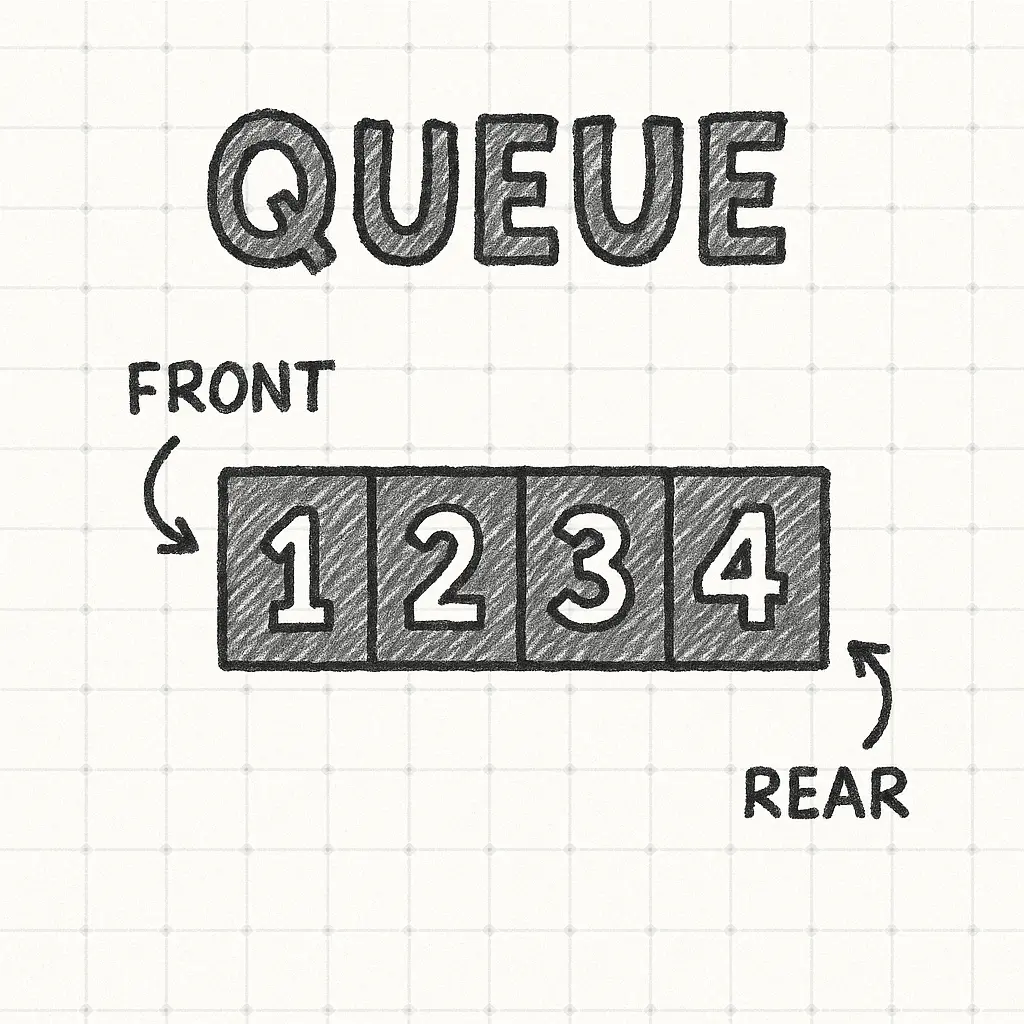
The queue interface is elegant in its simplicity. You need only three fundamental operations:
- Enqueue – Add an element to the rear of the queue.
- Dequeue – Remove and return the element at the front of the queue.
- Peek (or Front) – Examine the front element without removing it.
Additional utility operations often include checking if the queue is empty, getting its size, or clearing all elements.
Basic Queue in Python:
from collections import deque

class Queue:
    def __init__(self):
        self.items = deque()

    def enqueue(self, item):
        """Add item to rear of queue - O(1)"""
        self.items.append(item)

    def dequeue(self):
        """Remove and return front item - O(1)"""
        if self.is_empty():
            raise IndexError("Queue is empty")
        return self.items.popleft()

    def peek(self):
        """Return front item without removing - O(1)"""
        if self.is_empty():
            raise IndexError("Queue is empty")
        return self.items[0]

    def is_empty(self):
        """Check if queue is empty - O(1)"""
        return len(self.items) == 0

    def size(self):
        """Return number of items in queue - O(1)"""
        return len(self.items)

# Usage
task_queue = Queue()
task_queue.enqueue("Write documentation")
task_queue.enqueue("Review pull request")
task_queue.enqueue("Deploy to staging")

print(task_queue.dequeue())  # "Write documentation"
print(task_queue.peek())      # "Review pull request"
Under the hood, queues can be implemented using arrays or linked lists. Array-based implementations offer cache locality but may require resizing. Linked list implementations avoid resizing overhead but incur pointer memory costs and cache misses. Python’s deque (double-ended queue) uses a dynamic array of blocks, combining the benefits of both approaches.
flowchart LR
    subgraph Queue["Queue Operations (FIFO)"]
    direction TB
    A[Front] --> B[5] --> C[7] --> D[10] --> E[Rear]
    F["dequeue() → removes 5"] --> B
    G["enqueue(15) → adds to rear"] --> E
    end
How Queue Powers Scheduling Systems
The FIFO nature of queues makes them perfect for task scheduling, where fairness and order matter. When multiple tasks arrive, a queue ensures they’re processed in arrival order, preventing starvation and maintaining predictability.
Operating System Process Scheduling
Operating systems use queues extensively. In First-Come-First-Served (FCFS) scheduling, processes are placed in a ready queue. The CPU executes them in order, switching to the next process when the current one completes or blocks. Multi-level feedback queues extend this concept by maintaining separate priority queues, with processes moving between them based on behavior.
flowchart LR
    New[New Process] --> ReadyQ
    subgraph OS["OS Scheduler"]
        direction TB
        ReadyQ[("Ready Queue")]
        CPU[CPU Execution]
        WaitQ[("Waiting/Blocked Queue")]
    end

    ReadyQ -- Dispatch --> CPU
    CPU -- Terminate --> Exit[Exit]
    CPU -- I/O Request --> WaitQ
    WaitQ -- I/O Complete --> ReadyQ
    CPU -- Time Slice Expired --> ReadyQ
Backend Task Queues
Modern web applications offload time-consuming operations to background workers using task queues. When a user uploads a video, the web server enqueues a processing task and immediately returns a response. Worker processes—running on separate machines—dequeue tasks and process them asynchronously. This pattern decouples request handling from heavy computation.
# Producer - Web Server
from celery import Celery

app = Celery('tasks', broker='redis://localhost:6379/0')

@app.task
def process_video(video_id):
    # Expensive transcoding operation
    pass

# Enqueue task
process_video.delay(video_id=123)

# Consumer - Worker Process
# celery -A tasks worker --loglevel=info
# Workers automatically dequeue and execute tasks
Popular task queue systems include Celery (Python), Sidekiq (Ruby), Bull (Node.js), and message brokers like RabbitMQ, AWS SQS, and Apache Kafka. These systems handle distribution, retries, dead-letter queues, and monitoring—production-grade concerns beyond the basic data structure.
Frontend Event Loops
JavaScript’s event loop is essentially a queue. When you call setTimeout, click a button, or fetch data from an API, callback functions are enqueued in the task queue. The event loop continuously dequeues and executes these callbacks in order, maintaining the single-threaded concurrency model.
console.log("Start");

setTimeout(() => console.log("Timeout 1"), 0);
setTimeout(() => console.log("Timeout 2"), 0);

Promise.resolve().then(() => console.log("Promise 1"));

console.log("End");

// Output:
// Start
// End
// Promise 1  (microtask queue has higher priority)
// Timeout 1
// Timeout 2
The FIFO guarantee means tasks execute predictably. Without queues, race conditions would make concurrent programming nearly impossible.
Types of Queues
While the basic queue is powerful, many variations exist to handle specialized requirements.
Simple Queue (Linear Queue)
The standard FIFO queue described above. Once elements are dequeued, the front pointer advances but space isn’t reclaimed. This can lead to the “false overflow” problem where the rear reaches the array end even though the front has empty space.
Circular Queue
Solves the false overflow problem by wrapping around. When the rear reaches the array end, it circles back to index 0 if space is available. This maximizes space utilization and is commonly used in buffering scenarios.
class CircularQueue:
    def __init__(self, capacity):
        self.capacity = capacity
        self.queue = [None] * capacity
        self.front = -1
        self.rear = -1
        self.size = 0

    def enqueue(self, item):
        if self.size == self.capacity:
            raise OverflowError("Queue is full")

        if self.front == -1:
            self.front = 0

        self.rear = (self.rear + 1) % self.capacity
        self.queue[self.rear] = item
        self.size += 1

    def dequeue(self):
        if self.size == 0:
            raise IndexError("Queue is empty")

        item = self.queue[self.front]
        if self.front == self.rear:  # Last element
            self.front = self.rear = -1
        else:
            self.front = (self.front + 1) % self.capacity
        self.size -= 1
        return item
Priority Queue (Heap)
Elements are dequeued based on priority rather than arrival order. High-priority items jump the line. Typically implemented using heaps for O(log n) insertion and deletion. Used in Dijkstra’s algorithm, A* pathfinding, and operating system scheduling.
import heapq

class PriorityQueue:
    def __init__(self):
        self.heap = []
        self.counter = 0  # Tie-breaker for same priorities

    def enqueue(self, item, priority):
        # Lower number = higher priority
        heapq.heappush(self.heap, (priority, self.counter, item))
        self.counter += 1

    def dequeue(self):
        if not self.heap:
            raise IndexError("Queue is empty")
        return heapq.heappop(self.heap)[2]  # Return item only

# Usage
pq = PriorityQueue()
pq.enqueue("Low priority task", priority=5)
pq.enqueue("Critical bug", priority=1)
pq.enqueue("Medium task", priority=3)

print(pq.dequeue())  # "Critical bug"
print(pq.dequeue())  # "Medium task"
Deque (Double-Ended Queue)
Allows insertion and deletion at both ends. You can push and pop from either the front or rear, making it more flexible than a standard queue. Python’s collections.deque is the canonical implementation.
from collections import deque

dq = deque()
dq.appendleft("Front task")  # Add to front
dq.append("Rear task")        # Add to rear

print(dq.popleft())  # "Front task"
print(dq.pop())      # "Rear task"
Complexity and Design Trade-offs
Queue operations are typically very efficient when implemented correctly.
| Operation | Array-Based Queue | Linked List Queue | Circular Queue | Priority Queue (Heap) |
|---|---|---|---|---|
| Enqueue | O(1) amortized | O(1) | O(1) | O(log n) |
| Dequeue | O(1) or O(n)* | O(1) | O(1) | O(log n) |
| Peek | O(1) | O(1) | O(1) | O(1) |
| Space complexity | O(n) | O(n) | O(n) | O(n) |
| Cache performance | Excellent | Poor | Excellent | Good |
*Array-based queues with simple front pointer advancement waste space and may need O(n) shifting or resizing.
Queue vs Stack vs List:
- Queue (FIFO) – Fair ordering, task scheduling, buffering.
- Stack (LIFO) – Call stacks, undo operations, parsing.
- List – Random access needed, frequent indexed reads.
Common Pitfalls:
- Overflow – Enqueueing to a full queue. Fixed-size arrays require capacity checks or dynamic resizing.
- Underflow – Dequeueing from an empty queue. Always check
is_empty()first. - Concurrency issues – Multiple threads accessing the same queue without synchronization leads to race conditions. Use blocking queues or explicit locks.
- Memory leaks – Dequeued elements not being garbage collected if references remain.
Queue as a Life Metaphor for Task Scheduling
The queue isn’t just a data structure—it’s a mental model for managing work. Every software engineer faces a backlog of tasks: bug fixes, feature requests, code reviews, meetings, documentation. Without structure, this becomes overwhelming. Queue thinking provides clarity.
Simple Queue = Your Daily Task List
Start with the oldest task, finish it, move to the next. This prevents task hopping and context switching, which kills productivity. The discipline of FIFO ensures nothing gets forgotten at the bottom of the list.
Priority Queue = Triage and Impact
Not all tasks are equal. Critical production bugs need immediate attention, while nice-to-have features can wait. Priority queues let you maintain order within priority levels—among all P0 bugs, handle them FIFO. Among all P2 features, same rule applies.
Circular Queue = Sprint Planning
A sprint is a fixed-capacity buffer. You can only fit so many tasks in two weeks. When capacity is full, new tasks wait for the next sprint. The circular nature means you keep cycling through planning, execution, review, and retrospective.
Blocking Queue = Managing Interruptions
Set “office hours” where you’re available for questions. Outside those hours, requests queue up. This prevents constant interruptions while ensuring everyone eventually gets help. The blocking mechanism protects your focus time.
Deque = Urgent Interruptions
Sometimes a task truly can’t wait. A production outage gets pushed to the front of the queue, even if you’re mid-task. The deque allows this flexibility without abandoning the queue structure entirely.
The lesson is simple: treat your attention as a single-threaded processor. You can only execute one task at a time. Queue it, process it, complete it, then move on. Multitasking is a myth—it’s just thrashing between queues, losing context each time.
Design Trade-offs in Practice
| Approach | Strengths | Weaknesses | Where It Fits |
|---|---|---|---|
| Simple Array Queue | Cache-friendly, simple implementation | Wasted space, needs shifting | Small, bounded workloads |
| Circular Queue | Efficient space use, constant time ops | Fixed capacity | Ring buffers, embedded systems |
| Linked List Queue | Dynamic size, no resizing | Poor cache locality, pointer cost | Unbounded queues |
| Priority Queue | Important tasks first | More complex, O(log n) operations | Scheduling, pathfinding |
| Distributed Message Queue | Scalability, durability, fault tolerance | Network latency, operational cost | Microservices, event-driven systems |