Picture a skyscraper with a single elevator moving at walking speed. Every trip from floor 50 to the ground-floor café takes fifteen minutes. That’s computing without caching. Now add express elevators to every tenth floor, escalators between nearby floors, and coffee machines on each level. That’s layered caching—distributing speed so no one waits for the slowest part.
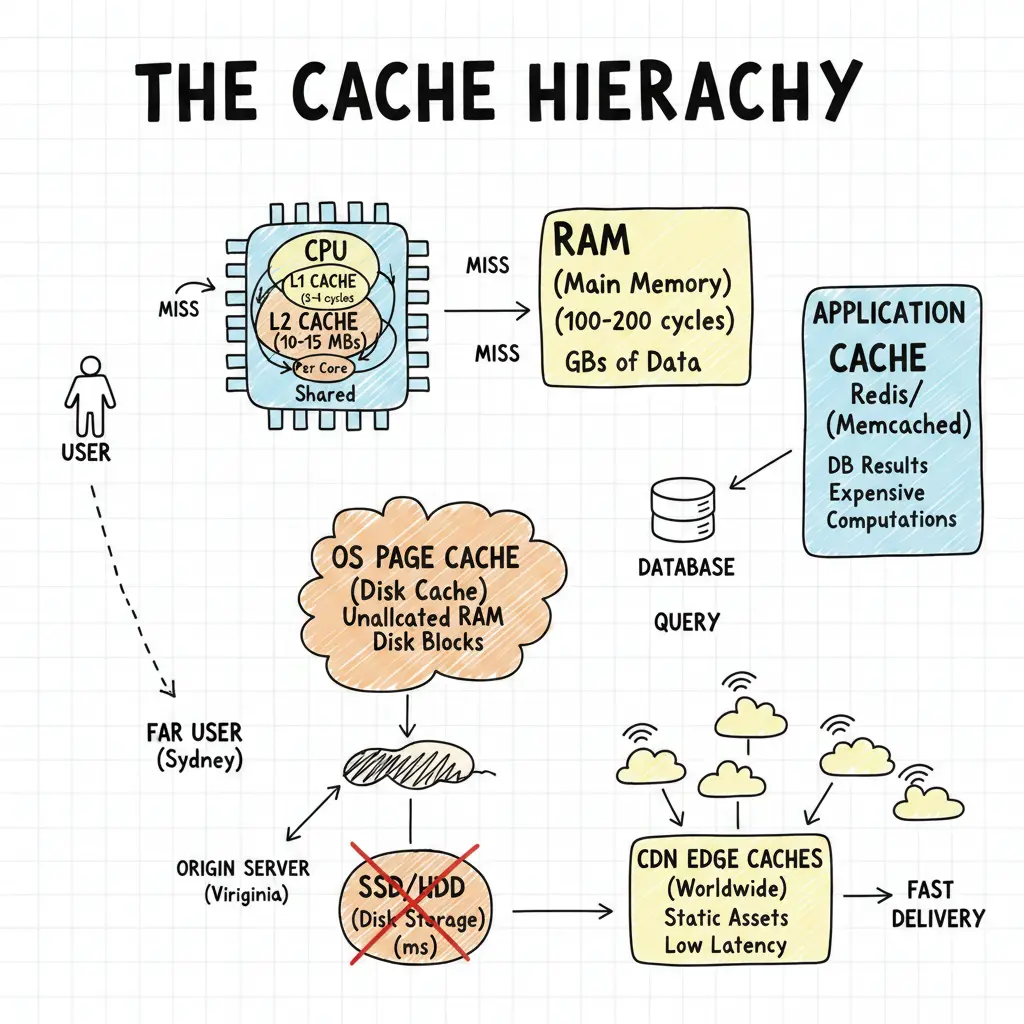
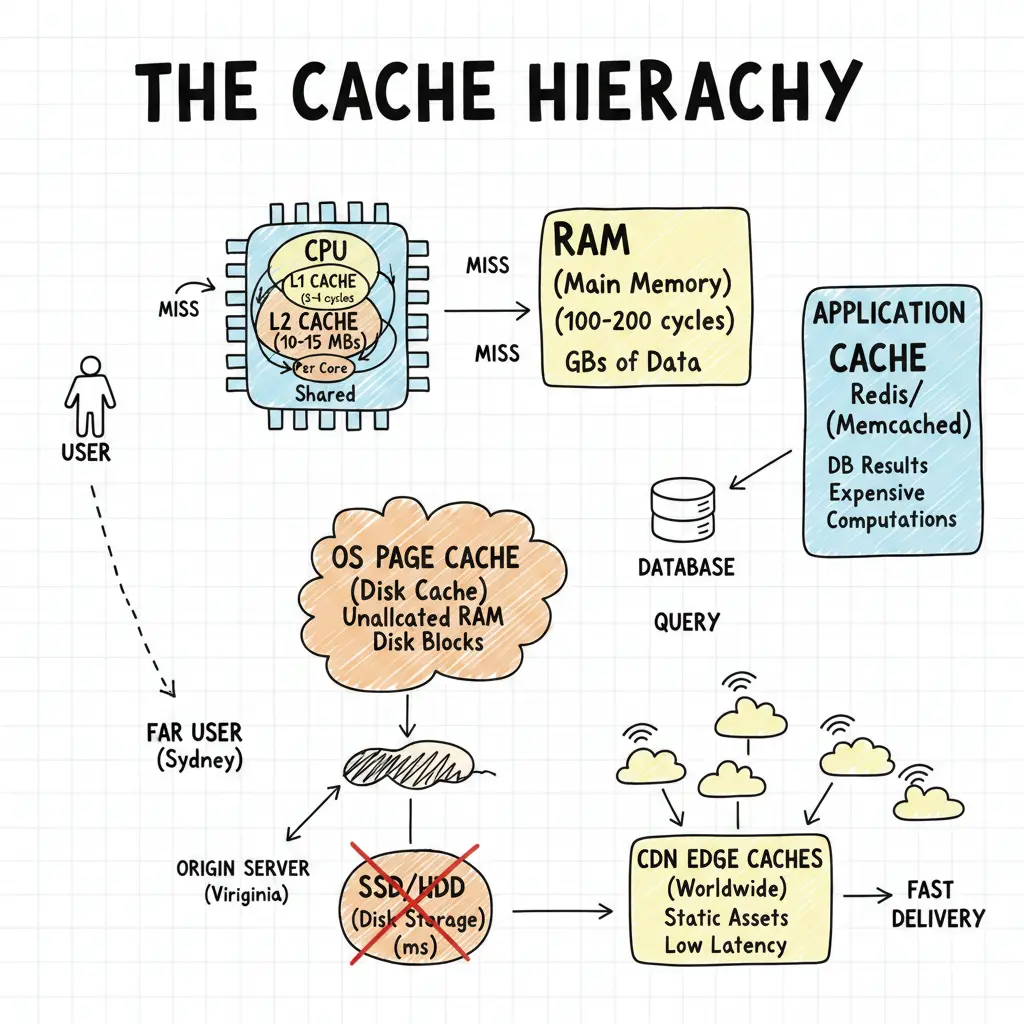
Modern systems have L1, L2, L3 CPU caches, OS page caches, database caches, application caches, and CDN edge caches. This looks redundant until you see each hides a different performance cliff. CPU to RAM: nanoseconds to microseconds—100x. RAM to disk: microseconds to milliseconds—1000x. Disk to network: milliseconds to tens of milliseconds—10-100x. Can’t solve a 100,000x latency problem with one cache. Need layers.
Why Each Layer Matters
It starts at the silicon level with the CPU Caches, designed to feed the processor’s insatiable appetite for data.
- L1 Cache (Level 1): The “first responder.” It’s usually split into two parts: one for instructions (code) and one for data. It runs at the CPU’s full speed, taking just 3-4 clock cycles to access. It’s tiny (usually 32KB-64KB) but critical for keeping the execution pipeline full.
- L2 Cache (Level 2): The “backup.” Larger than L1 (typically 256KB-1MB) but slightly slower (10-15 cycles). It catches what L1 misses and is often private to each core.
- L3 Cache (Level 3): The “shared hub.” Usually shared across all CPU cores. It’s much larger (tens of megabytes) and acts as a staging area for data shared between cores, preventing expensive trips to main memory.
When data isn’t in these caches, the CPU fetches from RAM (Main Memory). RAM is the “warehouse”—abundant (gigabytes) but significantly slower (100-200 cycles).
To avoid the massive penalty of going to physical storage (which is thousands of times slower than RAM), the OS Page Cache (Disk Cache) steps in. The operating system uses unallocated RAM to store frequently accessed disk blocks. If you open a file twice, the second time it likely comes from RAM, not the disk. Without these hardware and OS layers, the processor would spend most of its time waiting for data.
Then there’s application-level caching (Redis, Memcached). These caches store results of expensive computations or database queries in memory. If your app queries a database for user profiles, caching those profiles in Redis means subsequent requests hit the fast cache instead of the slow database.
Finally, CDNs cache static assets (images, CSS, JS) at edge locations worldwide. This reduces latency for users far from the origin server. A user in Sydney requesting a stylesheet from a server in Virginia would face 80ms+ latency. A CDN edge cache nearby can serve it in single-digit milliseconds.
The Latency Pyramid
Network latency: tens to hundreds of milliseconds cross-continental. Disk I/O: single-digit milliseconds. RAM: hundreds of nanoseconds. CPU registers: sub-nanosecond. Each layer is orders of magnitude faster, and each cache hides the layer below.
Browser requests a page? Check browser cache first. Miss? Ask CDN. CDN checks edge cache. Miss? Origin server checks application cache, then database query cache, then disk. Every hit saves you from falling down. Every miss waits for the next slowest thing.
graph TD
    A[User Request] --> B{"Browser Cache?"}
    B -- Hit --> C[Render Page]
    B -- Miss --> D{"CDN Edge Cache?"}
    D -- Hit --> C
    D -- Miss --> E{"App Cache (Redis)?"}
    E -- Hit --> C
    E -- Miss --> F{"DB Query Cache?"}
    F -- Hit --> C
    F -- Miss --> G[Disk I/O]
Hardware & OS Caching: The Foundation
The CPU runs at gigahertz speeds, but RAM can’t keep up. Fetching from memory: 100-200 CPU cycles—time for dozens of instructions. L1 cache: 3-4 cycles. L2: 10-15. L3 (shared): 40-50. These exploit instruction locality—code reuses memory in tight loops—and prefetch what’s next. Without them, CPUs idle waiting for data.
Below the hardware, the OS Page Cache hides disk latency. Disk I/O takes milliseconds—a million nanoseconds. The OS page cache in RAM caches frequent disk blocks. Read a file? OS pulls entire 4KB pages, betting you’ll read nearby data soon.
Key Difference:
- CPU Caches: Strict coherence (hardware managed).
- OS Page Cache: Weaker consistency (write-back, async flush).
Application & Database Caching: The Backend
Distributed systems talk over networks, and every hop adds milliseconds. Application caches (Redis, Memcached) sit in memory to cache backend results or expensive computations.
A common pattern is Cache-Aside:
def get_user_profile(user_id):
    # 1. Check Cache
    cache_key = f"user:{user_id}"
    profile = redis.get(cache_key)

    if profile:
        return deserialize(profile)

    # 2. Miss? Fetch from DB
    profile = db.query("SELECT * FROM users WHERE id = ?", user_id)

    # 3. Populate Cache (with TTL)
    redis.setex(cache_key, 3600, serialize(profile))

    return profile
This layer bridges the gap between fast services and slow databases. If the cache entry expires or is evicted, the application fetches fresh data and repopulates it.
Edge Caching: Defeating Geography
Network latency is limited by the speed of light. Sydney to Virginia is 16,000km—80ms minimum round-trip. CDNs cache content at edge locations near users. Requests hit nearby caches, return in single-digit milliseconds instead of crossing continents.
sequenceDiagram
    participant User
    participant Edge as CDN Edge (Sydney)
    participant Origin as Origin Server (Virginia)

    User->>Edge: GET /style.css
    alt Cache Hit
        Edge-->>User: 200 OK (from cache)
    else Cache Miss
        Edge->>Origin: GET /style.css
        Origin-->>Edge: 200 OK (content)
        Edge-->>User: 200 OK
    end
This layer has the loosest consistency. Edge servers cache with TTLs in minutes or hours. It works because most web content—images, stylesheets, JavaScript—is immutable or changes infrequently.
Closing Thoughts
Caching layers aren’t redundant—they’re cumulative. Each optimizes a different problem. L1 hides CPU-to-L2 latency. Application caches hide service-to-service network latency. CDNs hide geography.
The speed pyramid creates a smooth gradient from nanoseconds to milliseconds. Remove one layer, and you expose a performance cliff. Layered caching is risk mitigation: each layer reduces the probability of falling to the next slower tier.