When building software, one of the most fundamental decisions you’ll make is choosing the right data structure to store collections of elements. Most of the engineers first through is using array lists (like arrays, vectors, or ArrayLists). You’re already know its strengths: fast indexed access and great cache performance, ease of use. But what about linked lists? They offer flexibility with dynamic insertions and deletions, but at what cost? Have you ever wondered when to use one over the other?
Array List: The Contiguous Highway
Think of an array list as a clean, numbered shelf of boxes. You can instantly grab any box without touching the others. An array list (also called dynamic array, ArrayList in Java, vector in C++, or list in Python) stores elements in a contiguous block of memory. Think of it like a row of numbered parking spots—each spot has a fixed position, and you can jump directly to any spot by its number.
That design gives you instant access by index:
import java.util.ArrayList;

public class ArrayListDemo {
    public static void main(String[] args) {
        ArrayList<Integer> numbers = new ArrayList<>();

        // Adding elements - fast at the end
        numbers.add(10);    // O(1) amortized
        numbers.add(20);
        numbers.add(30);

        // Direct access by index - very fast
        int value = numbers.get(1);    // O(1) - returns 20

        // Inserting in the middle - slow
        numbers.add(1, 15);    // O(n) - shifts elements right
        // Now: [10, 15, 20, 30]

        // Removing from middle - slow
        numbers.remove(2);    // O(n) - shifts elements left
        // Now: [10, 15, 30]
    }
}
How it works?
flowchart TB
    %% Step 1: Initial append
    subgraph Step1["1️⃣ After adding 10, 20, 30"]
    direction LR
        S1_0["[0] 10"] --- S1_1["[1] 20"] --- S1_2["[2] 30"] --- S1_E["[3] ·"]
    end

    %% Step 2: Insert in middle
    subgraph Step2["2️⃣ Insert 15 at index 1 (O(n) shift right)"]
    direction LR
        S2_0["[0] 10"] --- S2_1["[1] 15 (new)"] --- S2_2["[2] 20 (shifted)"] --- S2_3["[3] 30 (shifted)"] --- S2_E["[4] ·"]
    end
    S1_1 -.shift→.-> S2_2
    S1_2 -.shift→.-> S2_3

    %% Step 3: Remove from middle
    subgraph Step3["3️⃣ Remove element at index 2 (value 20) → shift left"]
    direction LR
        S3_0["[0] 10"] --- S3_1["[1] 15"] --- S3_2["[2] 30 (shifted left)"] --- S3_E["[3] ·"]
    end
    S2_2 -.removed.-> S3_2

    Step1 --> Step2 --> Step3
When you add initialize an array list, it allocates a small block of memory. As you append elements, it fills up. When it runs out of space, it allocates a larger block (usually double the size), copies existing elements over, and frees the old block. This resizing is why appending is O(1) amortized—most appends are fast, but occasionally you pay the cost of copying everything.
Why engineers love array lists
1. Predictable access time Accessing any element by index is O(1). You can jump directly to the 1000th element without touching the first 999.
2. Cache-friendly Modern CPUs are optimized for sequential memory access. Array lists store elements contiguously, making iteration blazing fast due to better cache locality.
3. Compact Array lists have low memory overhead. They only store the elements and a small amount of metadata (like size and capacity). No extra pointers per element. Thus, they use memory efficiently.
4. Simple resizing logic Resizing logic is straightforward. Doubling capacity minimizes the number of resizes, keeping average insertion time low.
Things you should consider
1. Expensive insertions and deletions Inserting or deleting in the middle requires shifting all subsequent elements to maintain contiguity. For a list with 1 million elements, inserting at position 0 means moving 999,999 elements.
2. Costly resizing When the array fills up, the entire contents must be copied to a larger memory block. While amortized to O(1) through doubling strategies, individual resize operations can cause noticeable pauses.
3. Wasted space To avoid frequent resizing, array lists typically maintain extra capacity. A list with 100 elements might allocate space for 150, wasting 50 slots of memory.
4. Contiguous memory requirement Large array lists need a single large block of contiguous memory, which can be hard to find in fragmented memory spaces, potentially causing allocation failures even when total free memory is sufficient.
Linked List: Pointer Chain
A linked list stores elements as individual nodes scattered throughout memory, with each node containing data and a reference (pointer) to the next node. Traversal in linked list means following those pointers one by one until you arrive at your target.
Types of linked lists:
- Singly linked list: Each node points to the next node only
- Doubly linked list: Each node points to both next and previous nodes
- Circular linked list: The last node points back to the first
Example in Java:
public class LinkedListDemo {
    public static void main(String[] args) {
        LinkedList<Integer> numbers = new SinglyLinkedList<>();
        numbers.add(5);
        numbers.add(7);
        numbers.add(10);

         // Traversing the list
         for (int num : numbers) {
               System.out.println(num); // Outputs 5, 7, 10
    }
}
How it works?
flowchart TD
    subgraph LinkedList["Singly Linked List"]
    direction LR
    N1["val: 5 | next: →"] --> N2["val: 7 | next: →"] --> N3["val: 10 | next: null"]
    end

    subgraph DoublyLinkedList["Doubly Linked List"]
    direction LR
      D1["val: 5 | prev: null | next: →"] <--> D2["val: 7 | prev: ← | next: →"] <--> D3["val: 10 | prev: ← | next: null"]
      end
A node in linked list typically contains two parts: the data and a pointer to the next node. In a doubly linked list, there’s an additional pointer to the previous node. All the operations within Linked List involve manipulating these pointers and interacting with nodes.
It can be said that a node does not know about the entire list, it only knows about its immediate neighbors. This is why operations like insertion and deletion can be done efficiently without shifting elements. This is why linked lists excel at dynamic workloads where frequent insertions and deletions occur because they avoid the costly shifting of elements seen in array lists but just simply update node’s pointers.
Pros of Linked Lists
1. Efficient insertions and deletions Once you have a reference to a node, inserting or deleting adjacent to it takes constant time—just update a few pointers. No need to shift elements.
2. No resizing overhead The list grows and shrinks naturally by allocating or freeing individual nodes. No expensive “copy everything to a bigger array” operations.
3. No wasted space from over-allocation Each node uses exactly the memory it needs. There’s no need to maintain extra capacity for future growth.
4. Easy to implement certain operations Operations like reversing, splitting, or merging lists can be done by manipulating pointers without moving data.
Cons of Linked Lists
1. Slow random access To access the nth element, you must traverse n nodes from the head. Accessing the last element in a million-node list means following a million pointers.
2. Poor cache performance Nodes are scattered throughout memory, so each access likely causes a cache miss. Sequential iteration is much slower than with arrays.
3. Higher memory overhead Each node requires extra memory for pointers. A singly linked list needs one pointer per element, while a doubly linked list needs two. For small data types, this overhead can double or triple memory usage.
4. More complex implementation Managing pointers correctly is error-prone. Off-by-one errors, null pointer issues, and memory leaks are common pitfalls.
5. No backward traversal (singly linked) In a singly linked list, you can only move forward. Going back requires starting over from the head. Doubly linked lists solve this but add more memory overhead.
Difference between Array List and Linked List
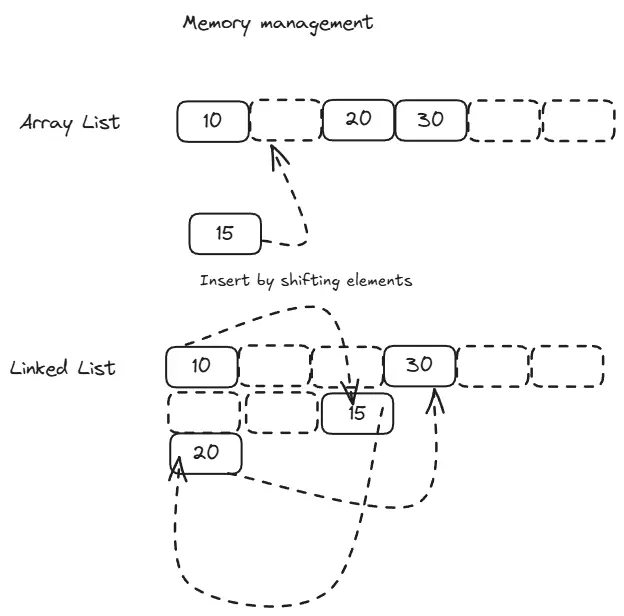
After going through the details of both data structures, the most noticeable difference between array list and linked list is how they manage memory and access elements.
An array list’s core design relies on a contiguous block of memory. This is what enables its signature O(1) indexed access, but it also introduces rigidity. Because the memory block is unbroken, inserting or deleting an element in the middle requires shuffling all subsequent items to maintain order. Furthermore, if the list outgrows its allocated space, it must find a new, larger block and copy every element over, which can be a costly operation.
In contrast, a linked list’s design is inherently flexible. Each element (node) can reside anywhere in memory, linked together by pointers. This allows for efficient insertions and deletions at any point in the list without needing to move other elements. However, this flexibility comes at the cost of access speed. To reach a specific element, you must traverse the list from the head, following pointers one by one, resulting in O(n) access time. Additionally, the scattered memory locations lead to poor cache performance and increased memory overhead due to storing pointers.
Performance Comparison
| Operation | Array List | Linked List (Singly) | Linked List (Doubly) |
|---|---|---|---|
| Access by index | O(1) | O(n) | O(n) |
| Search by value | O(n) | O(n) | O(n) |
| Insert at beginning | O(n) | O(1) | O(1) |
| Insert at end | O(1) amortized | O(n) without tail pointer, O(1) with | O(1) |
| Insert in middle | O(n) | O(1) after traversal | O(1) after traversal |
| Delete from beginning | O(n) | O(1) | O(1) |
| Delete from end | O(1) | O(n) | O(1) |
| Delete from middle | O(n) | O(1) after traversal | O(1) after traversal |
| Memory overhead | Low (just capacity) | Medium (one pointer) | High (two pointers) |
| Cache performance | Excellent | Poor | Poor |
When to Use Array Lists
Choose array lists when:
1. Random access is frequent
If your code regularly accesses elements by index (e.g., list[42]), array lists provide this in constant time.
2. Reads dominate writes When you read more often than you insert or delete, the fast access times outweigh the slow modification costs.
3. Sequential iteration is common Traversing an array list from start to finish is very fast due to cache locality.
4. Memory efficiency matters When storing millions of small objects, the per-element overhead of pointers in linked lists becomes significant.
5. You know the approximate size If you can estimate capacity upfront, you avoid resize operations and wasted space.
Common use cases:
- Implementing dynamic arrays, vectors, or buffers
- Storing configuration data or lookup tables
- Implementing stacks (when only end operations are needed)
- Database query results or API response data
- Most general-purpose list operations
When to Use Linked Lists
Choose linked lists when:
1. Frequent insertions and deletions If your workload involves constantly adding and removing elements (especially not at the end), linked lists shine.
2. You rarely access by index When you mostly iterate sequentially or maintain references to specific nodes, the O(n) access time doesn’t matter.
3. Unpredictable size changes When the list size varies wildly and you can’t predict capacity, linked lists avoid resize overhead.
4. You need efficient merging or splitting Combining or dividing linked lists is just pointer manipulation, while arrays require copying data.
5. Implementing other data structures Linked lists are building blocks for stacks, queues, hash table chaining, and graph adjacency lists.
Common use cases:
- Implementing queues (especially for task scheduling)
- Undo/redo functionality (doubly linked for bidirectional traversal)
- LRU (Least Recently Used) caches
- Polynomial arithmetic or sparse matrices
- Memory management (free list in allocators)
- Browser history navigation