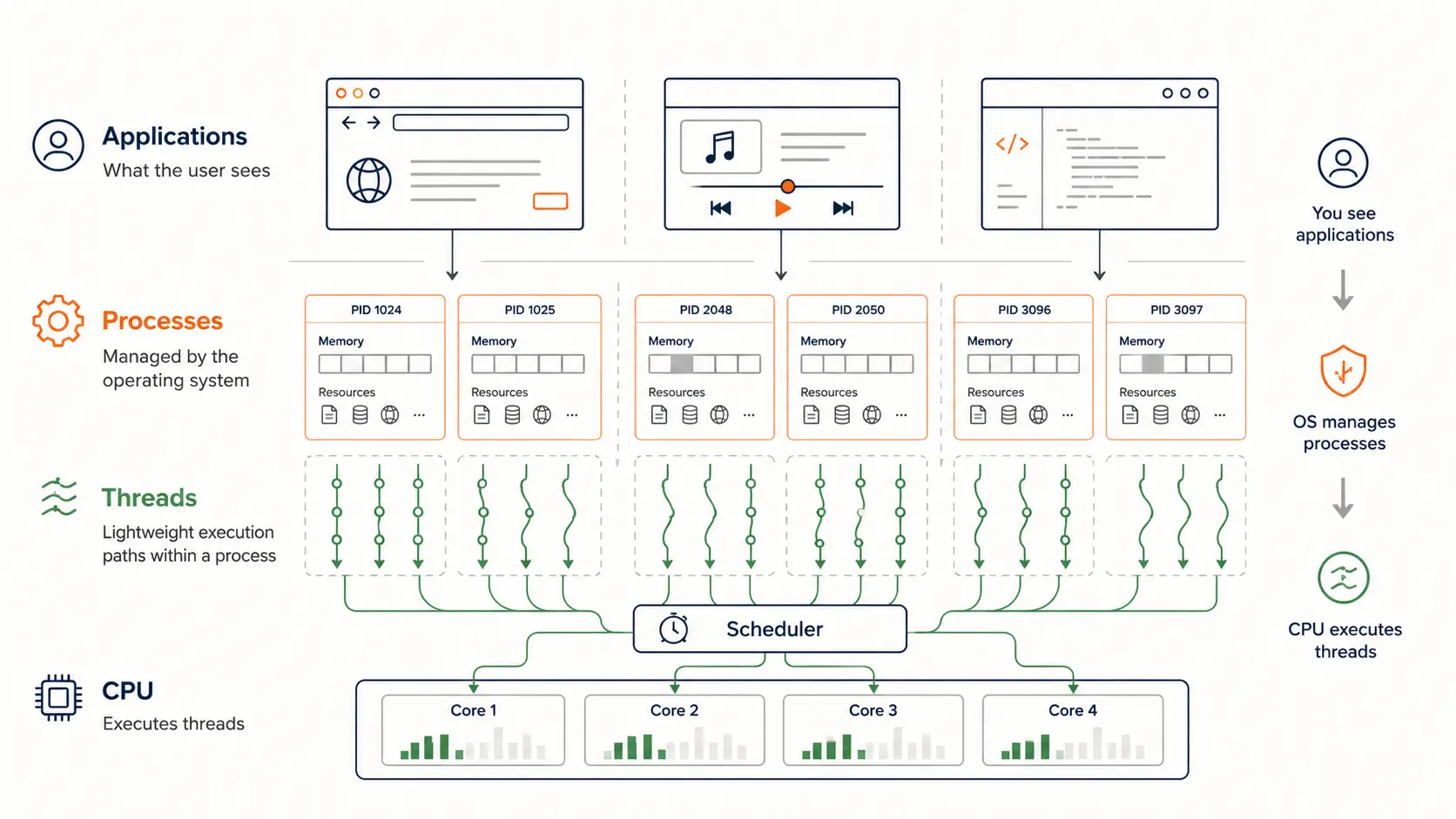
You open Chrome. Task Manager suddenly shows 15 processes. Activity Monitor reveals 200+ threads. Your CPU happily executes all of them. What’s actually happening? Most developers casually use terms like “app,” “process,” and “thread” as if they mean the same thing. They don’t. Understanding the difference unlocks why modern software behaves the way it does—and why certain bugs only appear under load.
What Users See vs What Systems Manage
When you double-click Chrome, Spotify, or VSCode, you think you’re launching “one application.” But peek under the hood with Task Manager, and you’ll see a sprawl: multiple processes, each containing dozens of threads. This isn’t accidental complexity—it’s deliberate architecture solving real problems around isolation, parallelism, and responsiveness.
The confusion stems from mixing three distinct layers:
- Applications are what users interact with—the product, the brand, the icon in the dock
- Processes are what operating systems manage—protected execution containers with isolated memory
- Threads are what CPUs actually execute—workers doing the real computation
These aren’t synonyms. They’re different abstractions at different system levels. An application often involves multiple processes. A process always contains at least one thread. And threads are the only things CPUs know how to run.
Applications: The Human-Facing Concept
An “application” is mostly a product concept, not a technical primitive. When you launch Chrome, you’re not starting a single executable—you’re activating an ecosystem. Modern Chrome runs:
- A browser process handling UI and coordination
- Multiple renderer processes (one per site, for security isolation)
- GPU process for hardware-accelerated graphics
- Network service process
- Storage service process
- Extension processes
- Utility processes for PDF rendering, spell check, and more
This isn’t bloat. It’s deliberate process isolation for security and stability. If one tab crashes parsing malicious HTML, only that renderer process dies. The browser survives. Your other tabs survive. That’s the value of multi-process architecture.
The same pattern shows up everywhere:
- VSCode runs an Electron shell, language servers, debuggers, and extension hosts—all separate processes
- Slack and Discord follow the Electron model: main process + renderer processes + utility workers
- Docker Desktop spawns processes for the daemon, VM management, and each running container
- Even Spotify splits UI rendering from audio decoding and network streaming
The key insight: applications are product packaging around many processes. The single icon you click might start a dozen system-level execution environments.
Processes: Isolated Execution Containers
A process is the operating system’s unit of resource ownership and isolation. When you start a process, the OS allocates:
- Virtual memory space (typically 4GB on 32-bit systems, terabytes on 64-bit)
- File descriptors (open files, sockets, pipes)
- Security context (user ID, permissions, capabilities)
- Process ID (PID) for system tracking
- At least one thread to actually execute code
The magic of processes is isolation. Each process sees its own private memory. One process cannot directly read or write another process’s memory without explicit OS permission (via shared memory APIs or inter-process communication). This prevents:
- Crashes from propagating: Spotify crashing won’t corrupt VSCode’s memory
- Security breaches from spreading: A compromised browser tab can’t steal SSH keys from your terminal
- Resource leaks from cascading: One process’s memory leak stays contained
Example: Process creation in Unix/Linux
#include <stdio.h>
#include <unistd.h>
#include <sys/types.h>

int main() {
    pid_t pid = fork();  // Creates a new process

    if (pid == 0) {
        // Child process
        printf("Child process PID: %d\n", getpid());
        printf("Parent PID: %d\n", getppid());
    } else {
        // Parent process
        printf("Parent process PID: %d\n", getpid());
        printf("Created child with PID: %d\n", pid);
    }

    return 0;
}
When you run this, fork() duplicates the process. The child gets a copy of the parent’s memory space (via copy-on-write optimization). They’re now independent execution containers.
The Cost of Isolation
Processes aren’t free. Creating a process involves:
- Allocating page tables for virtual memory mapping (typically 10-100 KB overhead)
- Setting up file descriptor tables
- Initializing security contexts
- Copying or sharing memory pages
Context switching between processes is expensive because the OS must:
- Save the entire CPU register state
- Switch memory mappings (flushing TLB caches)
- Restore the new process’s register state
- Resume execution
On modern x86-64 systems, a process context switch costs roughly 1-5 microseconds—insignificant for occasional switches, but measurable under heavy load with thousands of processes competing for CPU time.
Threads: The Actual Execution Workers
Here’s the critical realization: CPUs don’t execute processes. They execute threads.
A thread is the smallest unit of CPU scheduling—a sequence of instructions with its own:
- Program counter (pointing to the next instruction)
- Stack (for local variables and function calls)
- Register set (CPU state during execution)
But threads within the same process share everything else:
- The same memory space (heap, global variables, code)
- The same file descriptors
- The same security context
This sharing is what makes threads powerful for concurrency. Multiple threads can work on the same data structure simultaneously without expensive inter-process communication. But it’s also what makes threading bugs so dangerous—race conditions, deadlocks, and data corruption all stem from uncontrolled shared memory access.
Example: Creating threads in C
#include <pthread.h>
#include <stdio.h>

void* worker(void* arg) {
    int id = *(int*)arg;
    printf("Thread %d running\n", id);
    return NULL;
}

int main() {
    pthread_t threads[4];
    int ids[4] = {1, 2, 3, 4};

    // Create 4 threads, all sharing the same process memory
    for (int i = 0; i < 4; i++) {
        pthread_create(&threads[i], NULL, worker, &ids[i]);
    }

    // Wait for all threads to complete
    for (int i = 0; i < 4; i++) {
        pthread_join(threads[i], NULL);
    }

    return 0;
}
All four threads share the same address space. They can all access ids[] directly. No copying, no serialization, no IPC overhead. But also no safety—if multiple threads modify shared data without synchronization, you get race conditions.
Why Threads Exist: Responsiveness and Parallelism
Threads solve two critical problems:
1. UI Responsiveness
Imagine a single-threaded text editor. You click “Save.” The main thread starts writing to disk—a slow operation taking 100ms. During that time, the UI freezes. You can’t type, can’t scroll, can’t even move the window.
Solution: dedicate one thread to UI event handling, spawn worker threads for slow I/O. The UI thread stays responsive while background threads do the heavy lifting.
2. Parallel Computation
Modern CPUs have 8, 16, even 64 cores. A single-threaded application can only use one core. Threads let you distribute work across cores. A video encoder might spawn one thread per video segment, compressing them in parallel. Web servers spawn threads to handle multiple requests simultaneously.
The operating system’s thread scheduler decides which thread runs on which CPU core at any moment. On a quad-core machine, four threads can genuinely run in parallel—true concurrent execution, not just rapid context switching.
graph TB
    subgraph Application["Chrome Application (User sees one app)"]
        subgraph Process1["Browser Process (PID 1001)"]
            T1["UI Thread"]
            T2["Network Thread"]
            T3["I/O Thread"]
        end

        subgraph Process2["Renderer Process - Tab 1 (PID 1002)"]
            T4["Main Thread"]
            T5["Compositor Thread"]
            T6["Worker Thread"]
        end

        subgraph Process3["Renderer Process - Tab 2 (PID 1003)"]
            T7["Main Thread"]
            T8["Compositor Thread"]
        end

        subgraph Process4["GPU Process (PID 1004)"]
            T9["GPU Main Thread"]
            T10["GPU I/O Thread"]
        end
    end

    subgraph OS["Operating System Scheduler"]
        direction LR
        Core1["CPU Core 1"]
        Core2["CPU Core 2"]
        Core3["CPU Core 3"]
        Core4["CPU Core 4"]
    end

    T1 -.schedules.-> Core1
    T4 -.schedules.-> Core2
    T7 -.schedules.-> Core3
    T9 -.schedules.-> Core4
The Three-Layer Mental Model
This is the unlock—the sentence that clarifies everything:
CPUs schedule threads. Operating systems manage processes. Humans interact with applications.
When you debug “why is this app slow,” you need to think in all three layers:
- Application layer: Are multiple processes fighting for resources? Is Chrome running 20 tabs?
- Process layer: Is one process leaking memory? Are processes crashing and restarting?
- Thread layer: Is one thread blocking on I/O? Are 100 threads competing for one lock?
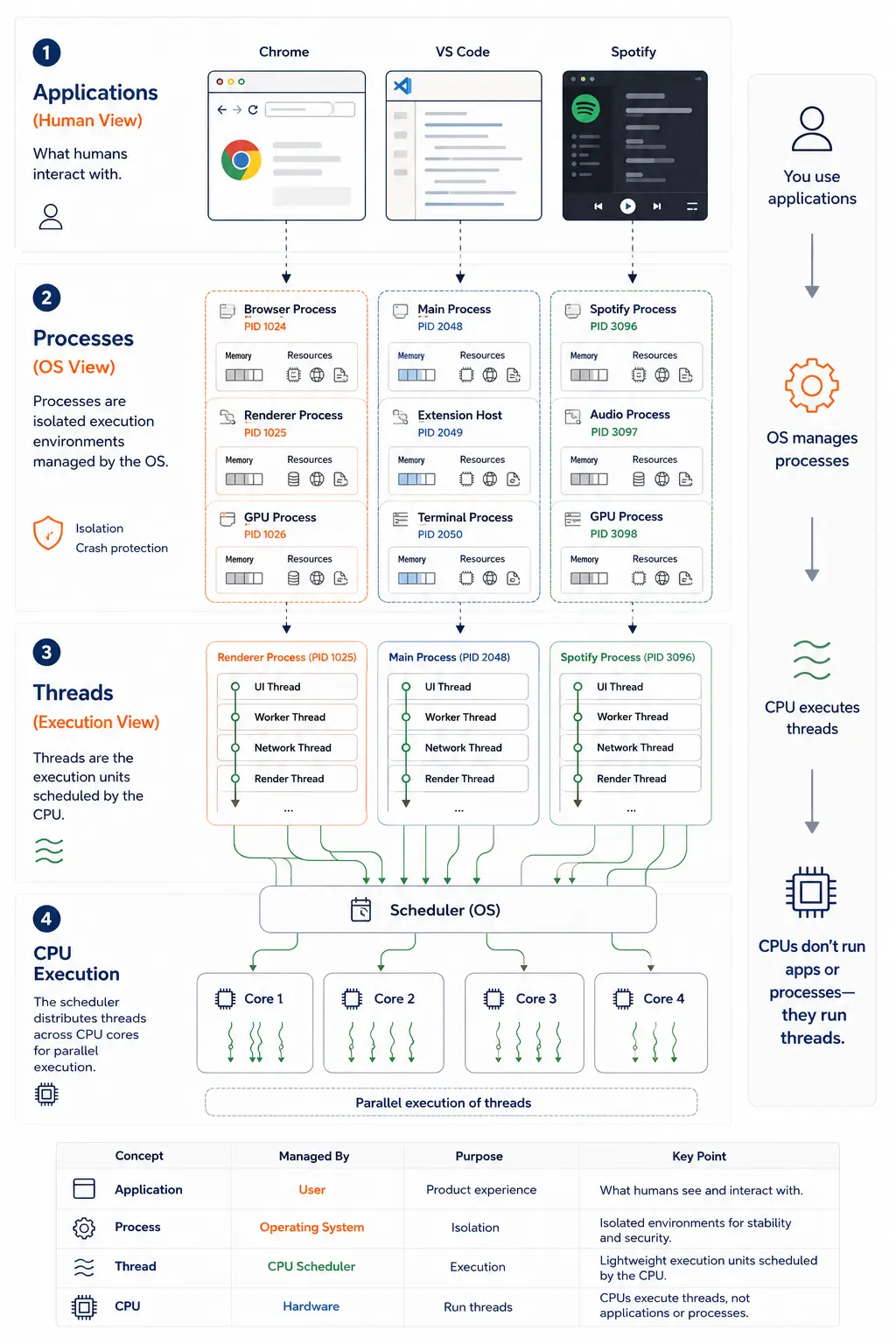
Real example: You open a Chrome browser tab. The browser process spawns a renderer process for that tab. The renderer process creates multiple threads: one for JavaScript execution, one for rendering, one for network requests. The OS schedules those threads across CPU cores. If the JavaScript thread blocks on a long-running script, the UI thread can still keep the tab responsive. If the renderer process crashes, the browser process can restart it without affecting other tabs.
Why Modern Systems Became This Complex
Older software followed a simpler model: one application = one process = mostly one thread. MS-DOS ran one program at a time. Early Windows had cooperative multitasking—applications had to voluntarily yield control.
That model collapsed under three pressures:
1. Multicore CPUs Demand Parallelism
A single-threaded application on a 16-core CPU wastes 15 cores. Video games now spawn dozens of threads: rendering, physics simulation, audio mixing, AI pathfinding, network synchronization—all running in parallel. Servers handle thousands of concurrent connections by distributing them across thread pools.
2. Security Requires Isolation
Web browsers navigate to untrusted websites constantly. Running all tabs in one process meant one malicious script could compromise the entire browser. Chrome pioneered sandboxed renderers—each site runs in a separate process with restricted OS permissions. Even if an attacker exploits a renderer, they’re trapped in a security sandbox.
3. UI Responsiveness Demands Asynchrony
Users expect instant feedback. Click a button, see a response in 16ms (one frame at 60 FPS). But network requests take 50-200ms. File I/O takes 5-50ms. Database queries take 10-100ms. The solution: keep the UI thread dedicated to rendering and input handling. Spawn background threads for all slow operations. When they finish, signal the UI thread to update.
Electron apps (VSCode, Slack, Discord) formalize this: a main process handles windowing and native APIs, renderer processes run web content in isolation, and worker threads handle CPU-intensive tasks.
Real Engineering Problems from Misunderstanding
Confusing these concepts leads to production bugs:
Thread Pool Exhaustion
A Java web service configures 200 threads in Tomcat’s thread pool. Each request spawns a thread. Under load, 200 concurrent requests saturate the pool. Request 201 waits. Response times explode. The fix: use async I/O (Netty, Vert.x) or increase the pool—but more threads means more context switching overhead.
Process Explosion
A poorly designed background job system spawns a new process per task. Under peak load, 10,000 tasks create 10,000 processes. The OS spends more time context switching than doing work. Memory explodes (each process has 10-100 MB overhead). The system thrashes. The fix: use worker pools—a fixed number of processes pulling tasks from a queue.
Blocking the UI Thread
A mobile app fetches data on the main thread. Network request takes 500ms. The UI freezes. Users see “Application Not Responding.” The fix: move I/O to background threads or use async/await patterns.
Race Conditions and Deadlocks
Two threads modify a shared bank account balance simultaneously without locks. Final balance is wrong. Or worse: Thread A locks resource X, waits for Y. Thread B locks Y, waits for X. Deadlock. System hangs. The fix: proper synchronization (mutexes, semaphores, atomic operations) or eliminate shared mutable state (actor model, message passing).
Memory Leaks Across Process Boundaries
A parent process spawns child processes but never calls wait() to collect their exit status. Child processes become “zombies”—dead but not reaped, still occupying process table slots. Eventually, the system can’t spawn new processes. The fix: proper cleanup in parent processes.
Connecting to Modern Development Patterns
Different languages and runtimes handle this differently:
Node.js: Single-threaded Event Loop
Node.js runs JavaScript in one thread per process. Concurrency comes from non-blocking I/O and the event loop—one thread handles thousands of connections by never waiting. CPU-intensive work requires spawning child processes (child_process, cluster) or using worker threads (worker_threads module).
Go: Goroutines and the Scheduler
Go abstracts threads with goroutines—lightweight green threads managed by the Go runtime. You can spawn 100,000 goroutines on a process with 4 OS threads. The Go scheduler multiplexes goroutines onto threads, automatically handling blocking I/O.
Java: Thread Pools and Virtual Threads
Traditional Java uses OS threads (via Thread class). Creating 10,000 threads is expensive. Modern Java (19+) adds virtual threads (Project Loom)—lightweight threads scheduled by the JVM, similar to goroutines. This enables massively concurrent applications without the overhead of one-thread-per-request.
Browser JavaScript: Web Workers
Browser JavaScript runs on the main thread. Long computations freeze the UI. Web Workers solve this by spawning separate threads for background work. Workers can’t access the DOM (isolation), but can compute in parallel and send results back via message passing.
Closing Thoughts
Modern software feels simple on the surface because operating systems hide enormous execution complexity underneath. When you click an icon, you’re not starting one program—you’re orchestrating dozens of isolated processes, each managing tens or hundreds of threads, all scheduled across multiple CPU cores, all coordinated through careful synchronization and message passing.
Understanding this hierarchy—application, process, thread—changes how you debug performance, design scalable systems, and reason about concurrency. The next time you see Task Manager showing 200 threads for “one app,” you’ll know exactly what’s happening: an application ecosystem, running in isolated process containers, executing parallel work across thread workers, all scheduled by the OS onto your CPU’s cores.
The abstractions exist for good reasons: security through isolation, performance through parallelism, and responsiveness through asynchrony. Master them, and you’ll write systems that are fast, stable, and correct under load.