Every program you write is like running a busy restaurant. Orders (functions) come in, chefs (the CPU) execute them, and ingredients (data) need to be placed somewhere. But where do you keep them? You’ve got the counter right in front of you—fast but cramped. And then you’ve got the storage room in the back—big and flexible but slower to access. In programming, these two spaces are the stack and the heap.
Program Memory Layout
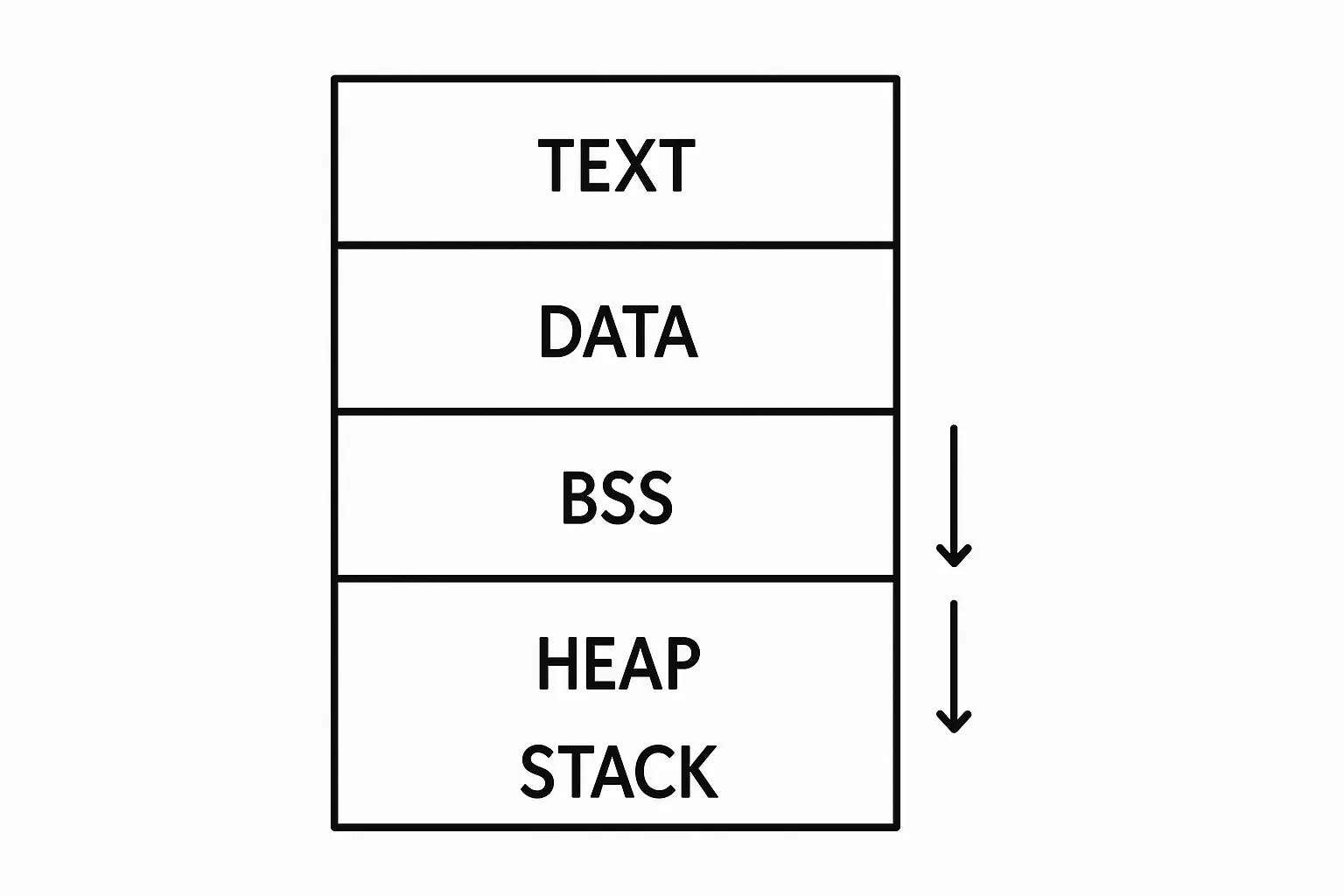
Before diving into stack and heap, let’s quickly outline the memory layout of a typical program. When the file is loaded into memory, it is divided into several segments:
graph TD
    A["Stack Segment
Call frames"]:::stack
    B["Heap Segment
Dynamic allocation"]:::heap
    C["BSS Segment
Uninitialized data"]:::bss
    D["Data Segment
Initialized data"]:::data
    E["Text Segment
Read-only machine code"]:::text

    A -->|Predefined variables and function calls| B
    B -->|Dynamic memory allocation| C
    C -->D
    D -->E
-
Text Segment (the blueprint floor) This is where your program’s instructions live—the compiled machine code that the CPU actually executes. It’s typically read-only, so you can’t accidentally overwrite your code while it’s running.
-
Data Segment (the pantry with labeled jars) Here we keep global and static variables that are already initialized before the program starts. For example, int counter = 5; would live here. Every time you check, it’s sitting neatly in its jar with its value.
-
BSS Segment (the empty shelves) This holds global and static variables that are declared but not initialized. Think of empty containers waiting to be filled once the program runs. For example, int counter; without an initial value belongs here.
-
Heap Segment (the warehouse that grows upward) This is your program’s flexible storage room. When you ask for dynamic memory at runtime—like creating a list, tree, or an object—the allocator carves out space here. It expands as needed, “growing upward” into free memory.
-
Stack Segment (the counter that grows downward) At the other end sits the stack. Every time a function is called, a new stack frame is pushed here containing its local variables, parameters, and return address. When the function finishes, the frame is popped off. It’s fast, but limited in size, and it “grows downward” toward the heap.
Stack Memory: Fast and Organized
When you call a function, imagine the chef placing a cutting board and ingredients right on the counter. That’s the stack frame—local variables, parameters, return address. Everything is neatly piled, and when the dish is done, the cutting board gets cleared instantly.
This is why stack is blazing fast: it only ever works with the “top plate.” But counters are small. Try piling too many cutting boards (deep recursion) or one that’s way too big (large local arrays), and you’ll hit a stack overflow.
Example of stack usage:
// example.cpp
void calculateSum() {
    int a = 10;        // Stored on stack
    int b = 20;        // Stored on stack
    int result = a + b; // Stored on stack

    // When function ends, all variables automatically cleaned up
}

int main() {
    calculateSum();
    return 0;
}
With above example, the program will start with main(), which calls calculateSum(). Each function call creates a new stack frame that holds its local variables. When calculateSum() finishes, its stack frame is popped off, and all its local variables are automatically cleaned up.
sequenceDiagram
    participant Program as Program Start
    participant Main as main()
    participant Stack as Call Stack
    participant Calc as calculateSum()

    Program->>Main: Enter main()
    Main->>Stack: Push stack frame for main()
    Main->>Calc: Call calculateSum()
    Calc->>Stack: Push stack frame for calculateSum()
    Note over Stack: Local vars
a=10, b=20, result=30
    Calc-->>Stack: Pop stack frame
clean up a, b, result
    Calc-->>Main: Return to main()
    Main-->>Stack: Pop stack frame for main()
    Main-->>Program: Exit program
Max stack size
Each thread has its own stack, and the size is typically limited (often between 1MB to 8MB by default, depending on the system). You can usually configure this limit when you create a thread or via compiler settings.
For Linux, you can check the stack size limit using the command:
ulimit -s

...

# Example output
8192  # Size in KB (8MB)
The ulimit command shows the maximum stack size for processes started from that shell. You can change it with ulimit -s <size_in_kb>.
So the stack size is limited and relatively small, which is why it’s best for small, short-lived variables. But what happens when you need more space or longer-lived data? This is where heap memory comes in.
Heap Memory: Flexible but Complex
Now picture the chef needing a 50-liter pot or ingredients that will be used all day. The counter won’t cut it. The chef yells to the back: “Bring me one from storage!” That’s heap allocation.
#include <iostream>

void createArray() {
    int* arr = new int[100]; // Allocated on heap
    // Use the array...
    delete[] arr; // Must manually free heap memory
}
The storage room is vast and flexible. You can keep objects there long after a single function is finished. But it takes longer to fetch items, and you have to keep track of what’s in storage—otherwise the kitchen clogs up with unused junk (memory leaks). Modern languages hire “cleaners” (garbage collectors) who walk around the storage room, tossing unused stuff.
Example of heap usage:
#include <iostream>

void createArray() {
    int* arr = new int[100]; // Allocated on heap
    // Use the array...

    delete[] arr; // Must manually free heap memory
}
Note that in the above example, new allocates an array on the heap. Unlike stack variables, this memory persists until you explicitly free it with delete[]. If you forget to free it, the memory remains allocated in the heap until the program ends, leading to memory leaks. If too much memory is allocated on the heap without being freed, the program may run out of memory and cause a crash.
Stack vs Heap Comparison
| Factors | Stack (Counter) | Heap (Storage Room) |
|---|---|---|
| Speed | Lightning fast – grab from the top | Slower – walk to storage, find space |
| Size | Small, per chef (thread) | Big, shared by all |
| Lifetime | Cleared when the dish (function) ends | Lives until you throw it out (delete/GC) |
| Risk | Counter overflow (stack overflow) | Messy room (fragmentation, leaks) |
When to Use Which
Choose stack memory for
- Small, short-lived variables
- Function parameters and return addresses
- Situations where speed is critical
Choose heap memory for
- Large data structures
- Objects that need to persist beyond a single function call
- Dynamic memory allocation (e.g., arrays whose size is not known at compile time)
Closing
Knowing how to use stack and heap memory effectively is like running a well-organized kitchen. Use the counter for quick tasks and the storage room for big, complex needs. Mastering this balance will make your programs efficient, robust, and ready to handle any culinary challenge that comes their way!