Relational databases power most products. The trick is not SQL syntax. It is how rows land on disk and get back to you in as few I/O ops as possible.
Note: All examples use PostgreSQL syntax, but the concepts apply broadly to other relational databases like MySQL, Oracle, and SQL Server.
Internal ID Systems and Row Tracking
Have you ever ask the question: “How do databases keep track of records without the primary or unique columns”? - In some popular databases, they use internal row identifiers.
Relational databases use sophisticated internal identification systems to track and locate table rows efficiently. Each row must be uniquely identifiable for updates, deletes, and joins to work correctly.
Example: PostgreSQL uses a Tuple Identifier (TID) consisting of a page number and slot number within that page. Oracle employs ROWID, which encodes file number, block number, and row number. SQL Server uses Row Identifiers (RIDs) for heap tables and clustered index keys for indexed tables.
Relational databases separate the concept of a row’s identity from its logical key values. This abstraction allows for flexible storage management and optimization without impacting how users interact with their data.
Consider a table employees with columns id (INT), name (VARCHAR), and hire_date (DATE). The database assigns an internal ID to each row, which it uses for all internal operations.
The actual columns in table are:
| Column Name | Data Type |
|---|---|
ctid |
TID |
id |
INT |
name |
VARCHAR |
hire_date |
DATE |
When you insert a new employee record, the database generates an internal ID (like ctid in PostgreSQL) that points to the physical location of that row on disk. This internal ID is not exposed to users but is crucial for the database’s internal operations.
At now, the ctid seem unnecessary need, but I will explain more about it in the next section. When the db use it to locate the row, it will translate ctid to page number and slot number during the query execution on index scan or sequential scan.
Example accessing row identifiers:
-- PostgreSQL: View internal row identifiers
SELECT ctid, id, name, hire_date FROM employees;
-- This query returns the internal `ctid` along with user-defined columns.
-- Example output:
--  ctid  | id |   name   | hire_date
-- (0,1) | 123 | John Doe | 2020-01-15
Pages: The Fundamental I/O Unit
Reading or writing data in larger blocks reduces the number of I/O operations required, which is crucial since disk access is orders of magnitude slower than memory access. By grouping multiple rows into a single page, databases can efficiently load and cache data.
Imagine a page as a container that holds several rows of a table. When a query requests data, the database reads the entire page into memory, allowing it to access all rows within that page without additional disk reads.
This page-based approach also enables better use of memory caching. Frequently accessed pages can be kept in a buffer pool, reducing the need for repeated disk access.
Rows, columns, and pages: the on-disk hierarchy
Database systems organize data into a hierarchical structure of rows, columns, and pages to balance storage efficiency with access performance.
Rows contain related data fields. Each row represents a single entity instance with fixed or variable-length columns. Variable-length columns (like VARCHAR) require additional metadata to track field boundaries and lengths.
Pages are fixed-size storage units. Most databases use 4KB, 8KB, or 16KB pages as the fundamental unit of disk I/O. Each page contains multiple rows along with metadata including page headers, row directories, and free space tracking.
Columns define data types and constraints. Each column in a table has a defined data type (e.g., INT, VARCHAR) and may have constraints (e.g., NOT NULL, UNIQUE) that enforce data integrity.
Pages enable batch processing. Instead of reading individual rows, the database reads entire pages into memory buffers. This approach reduces I/O overhead since accessing neighboring rows becomes essentially free once a page is loaded.
Buffer pool management controls page caching. The database maintains a buffer pool in memory containing recently accessed pages. Popular algorithms like LRU (Least Recently Used) determine which pages to evict when memory fills up.
For above employees table, assume each row takes approximately 100 bytes. If the database uses 8KB pages, each page can hold about 80 rows (8192 bytes / 100 bytes per row). Thus, the table’s data will be organized into pages of 80 rows each.
Page 1 will have rows 1-80, Page 2 will have rows 81-160, and so on. When a query requests employee data, the database reads the relevant page(s) into memory, allowing efficient access to multiple rows at once.
Example query processing:
SELECT name, hire_date FROM employees WHERE id = 123;
-- The database locates the page containing the row with id=123, reads it into memory, and retrieves the requested columns.
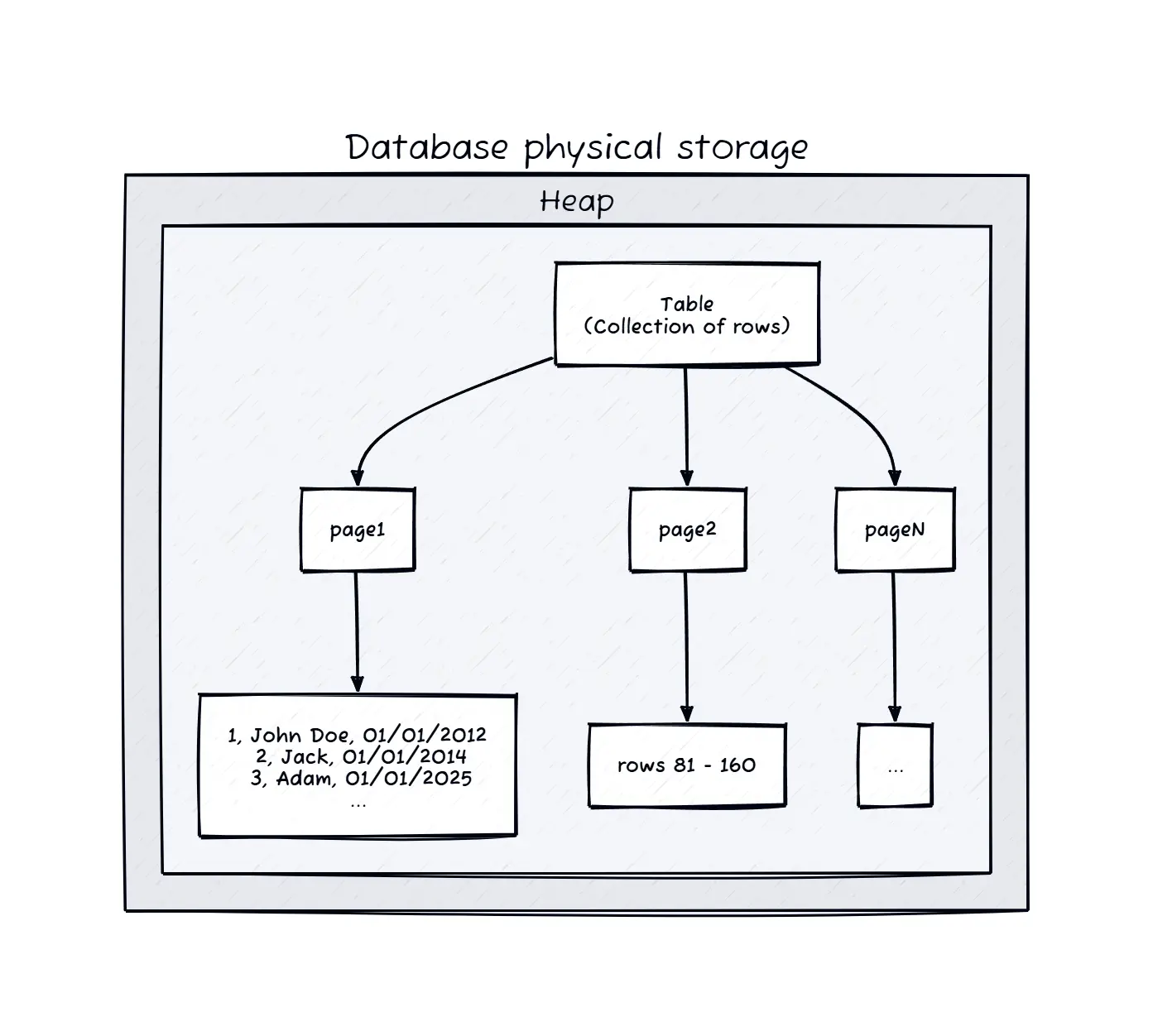
Above image describes the physical storage hierarchy in a relational database, illustrating how rows and columns are organized within pages. Above of all there is Heaps, which is the low-level storage structure for tables. I will explain more about Heaps in the next section.
Heap Storage and Data Organization
A Heap is low-level storage structure used by relational databases to store table rows in an unordered manner.
Heaps provide the fundamental unordered storage structure for table data in most relational database systems. In a heap, rows are stored in no particular order, allowing for fast insert operations. New rows are simply appended to the end of the table’s data file, making heaps ideal for workloads with frequent inserts.
However, reading fragmented data from a heap can be inefficient. Since rows are not organized based on any key, queries that filter or sort data may require scanning the entire table, leading to high I/O costs. So how do we mitigate this?
Indexes: Mapping Keys to Rows
An index is a data structure that maps key values to the physical locations of rows in a table, significantly improving query performance. Indexes are built on top of heaps to provide efficient access paths for queries that filter or sort data based on specific columns.
Indexes can be thought of as lookup tables that allow the database to quickly find rows without scanning the entire heap. They are typically implemented using B-trees or hash tables, which provide logarithmic or constant time complexity for lookups.
Back to above example, now we put index in column hire_date. When you run a query filtering by hire_date, the database can use the index to quickly locate the relevant rows instead of scanning the entire heap.
Example creating an index:
CREATE INDEX idx_hire_date ON employees (hire_date);
-- This index allows fast lookups of employees by their hire date.

SELECT name FROM employees WHERE hire_date = '2023-01-01';
-- The database uses the index to find rows with hire_date '2023-01-01'
And here how the index structure looks like:
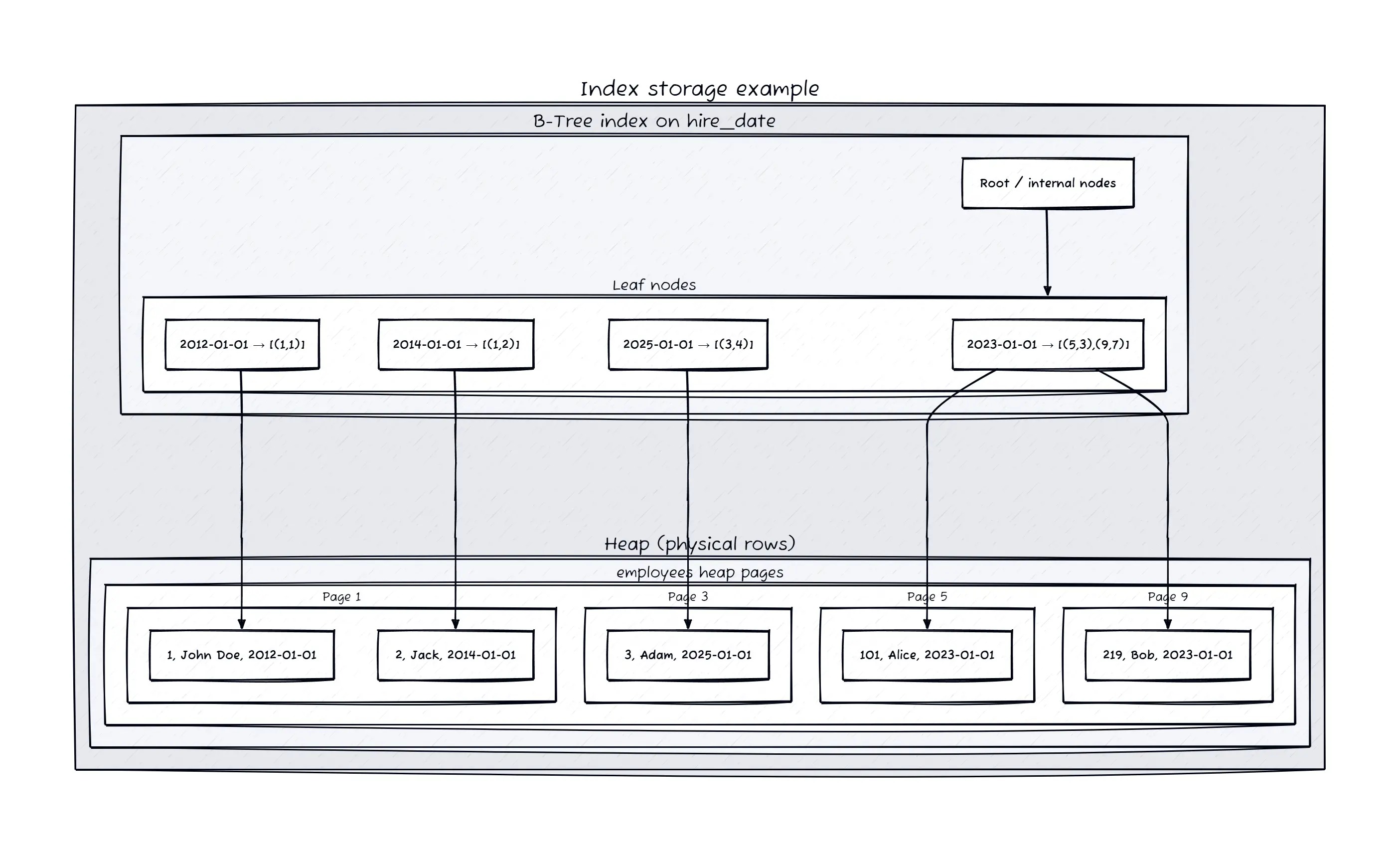
Once you create an index, the database create a separate data structure that maps the indexed column values to the corresponding row locations. In postgreSQL, the index entries contain the indexed column value and the ctid (internal row identifier) pointing to the actual row in the heap and the page number and slot number within that page.
When a query uses the indexed column in its WHERE clause, the database can quickly traverse the index to find the relevant ctid values, then use those to directly access the rows in the heap. This drastically reduces the number of pages that need to be read from disk, improving query performance.
Quick Recap
- Relational databases use a combination of internal row identifiers, page-based storage, heaps, and indexes to efficiently store and retrieve data.
- By leveraging indexes and considering data organization, you can minimize I/O operations and ensure your database scales effectively with your application’s needs.