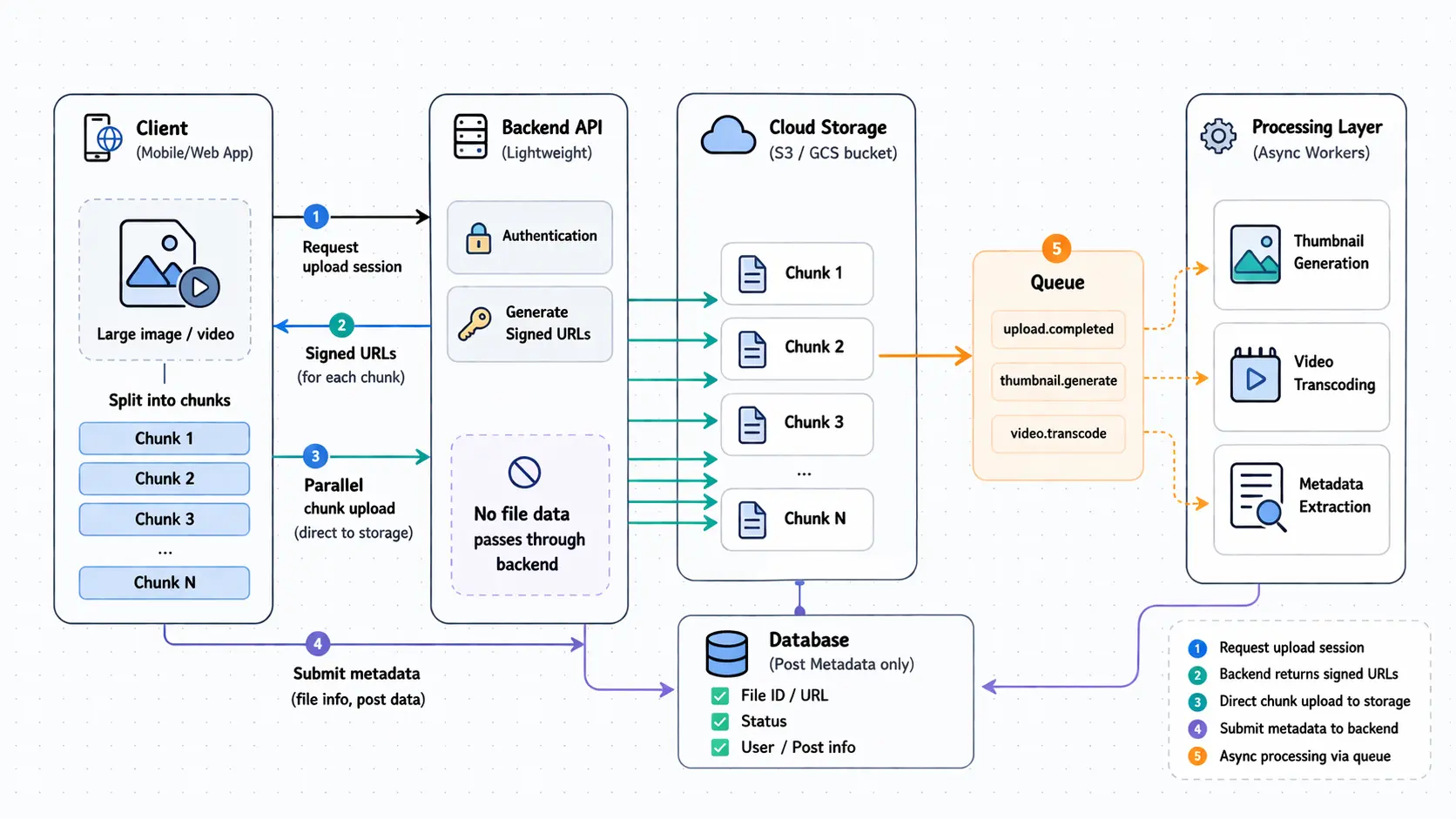
When you upload a 4GB video to YouTube, a 50MB high-res photo album to Instagram, or a 2-hour podcast to Spotify, those files don’t go through a traditional web server’s memory. If they did, the servers would collapse under memory pressure, timeouts would cascade, and the platform would be unusable. Modern systems handle massive file uploads differently—by never touching the files at all.
The key architectural principle is decoupling. Upload is not processing. Processing is not storage. The backend orchestrates but doesn’t handle bytes. This separation lets platforms scale to millions of concurrent uploads without melting infrastructure. This article explains how engineers actually build this, from the naive approach that breaks to the production patterns that ship.
The Naive Approach That Doesn’t Work
The simplest implementation is also the worst. Client sends file via multipart/form-data, backend receives entire file in memory, writes to disk, then stores in cloud. Here’s why this fails at scale:
Memory exhaustion. Web servers load entire request bodies into RAM. Ten concurrent 500MB uploads consume 5GB of server memory. Scale that to thousands of users and the server runs out of memory.
Timeout failures. Uploading 1GB over a 10Mbps connection takes 13 minutes. HTTP load balancers and proxies typically timeout connections after 30-60 seconds. Large uploads never complete.
Server blocking. While the backend reads bytes and writes to storage, that worker thread is occupied. With limited worker pool sizes (common in frameworks like Django, Rails, Express), the server exhausts available workers. New requests queue or get rejected.
No retry mechanism. If upload fails at 95% completion due to network hiccup, the entire upload must restart from zero. User frustration and wasted bandwidth.
Scaling impossibility. Autoscaling doesn’t help. Adding more servers means more memory consumption across the fleet. The problem is architectural, not resource allocation.
This approach might work for a prototype handling 10KB profile pictures. It breaks immediately when files reach tens or hundreds of megabytes.
Core Concepts That Actually Work
Modern platforms decompose the upload problem using several battle-tested techniques. These aren’t theoretical—they’re what Instagram, YouTube, and TikTok actually use.
Chunked Upload
Split large files into smaller chunks (typically 5-10MB) and upload them sequentially or in parallel. Each chunk is an independent HTTP request.
Why this works: Instead of a single 2GB request that times out, you get 400 separate 5MB requests. Each completes in seconds. Network interruptions affect only one chunk, not the entire file. The server never sees the full file at once.
Implementation: Client-side JavaScript or mobile app splits the file using Blob slicing. Server receives chunks and reassembles them, or stores them separately until finalization. Common in services like AWS S3 Multipart Upload, Google Cloud Storage resumable uploads, and Azure Block Blobs.
Resumable Upload
When a chunk fails, retry just that chunk instead of restarting the entire upload. This requires tracking which chunks have successfully uploaded.
Why this matters: A 1GB upload over unreliable mobile network might fail multiple times. Resumability means continuing from where it broke, not restarting from zero. User uploads 60% of a video, loses connectivity, reconnects, and continues from 60%.
Standards: Protocols like TUS (Tus Upload Protocol) formalize this. The server returns progress metadata. Client includes chunk sequence numbers and offset positions. On reconnection, client queries server for last successful offset and resumes.
Parallel Upload
Upload multiple chunks concurrently instead of sequentially. A 500MB file split into 50 chunks of 10MB each can upload 5-10 chunks simultaneously.
Performance gain: If network bandwidth supports it, parallel upload reduces total upload time significantly. Sequential upload at 10MB/sec takes 50 seconds for 500MB. Parallel upload with 5 concurrent streams takes ~12 seconds (accounting for overhead).
Trade-off: More complexity in orchestration. Must coordinate chunk ordering for reassembly. Must manage connection pool limits. Not always beneficial on low-bandwidth connections where parallel streams compete for the same limited bandwidth.
Streaming (Not Buffering)
Avoid loading the entire file into server memory. Stream bytes directly from the incoming HTTP request to cloud storage without buffering.
How it works: Web frameworks with streaming support (Node.js streams, Go io.Reader, Python asyncio) read chunks from the request body and immediately write to the destination. Memory usage stays constant regardless of file size.
Limitation: Still ties up a worker thread for the duration of upload. Better than memory exhaustion, but doesn’t fully solve the scalability problem. This is why the next technique matters most.
Direct-to-Cloud Upload (Critical Pattern)
The backend does not handle file bytes at all. Instead, it generates a signed URL (pre-authenticated temporary upload link) and returns it to the client. The client uploads directly to cloud storage (S3, GCS, Azure Blob).
Why this is transformative:
- Backend server never sees file bytes. No memory pressure.
- No worker threads occupied by long-running uploads.
- Cloud storage is built for massive parallel I/O and petabyte scale.
- Upload speed limited by client bandwidth and cloud storage capacity, not backend infrastructure.
- Backend handles only lightweight metadata operations (milliseconds, not minutes).
How signed URLs work:
- Client requests upload permission from backend.
- Backend validates user, checks quota, generates signed URL with expiration (e.g., 1 hour).
- Backend returns signed URL to client.
- Client uploads directly to cloud storage using that URL.
- Cloud storage validates signature, accepts upload, stores file.
- Client notifies backend that upload completed, sends metadata.
- Backend records file location, kicks off async processing.
This is the single most important architectural pattern for large file uploads at scale.
Production Architecture Workflow
Here’s the step-by-step flow used by platforms like YouTube and Instagram:
Step 1: Client Requests Upload Session
POST /api/uploads/initiate
Authorization: Bearer <token>
Content-Type: application/json

{
  "filename": "vacation.mp4",
  "filesize": 2147483648,
  "content_type": "video/mp4"
}
Backend validates:
- User authenticated and authorized
- File size within quota
- Content type allowed
Backend generates unique upload session ID and signed URL(s).
Step 2: Server Returns Signed Upload URLs
{
  "upload_id": "abc-123-def",
  "upload_urls": [
    "https://storage.googleapis.com/uploads/abc-123-def/chunk-1?signature=...",
    "https://storage.googleapis.com/uploads/abc-123-def/chunk-2?signature=..."
  ],
  "chunk_size": 10485760,
  "expires_at": "2026-04-15T03:45:00Z"
}
Each signed URL is valid for limited time (1 hour typical). Includes cryptographic signature that cloud storage validates.
Step 3: Client Uploads Directly to Cloud Storage
// Client-side pseudocode
const file = document.getElementById('fileInput').files[0];
const chunkSize = 10 * 1024 * 1024; // 10MB
const chunks = Math.ceil(file.size / chunkSize);

for (let i = 0; i < chunks; i++) {
  const start = i * chunkSize;
  const end = Math.min(start + chunkSize, file.size);
  const chunk = file.slice(start, end);

  await fetch(uploadUrls[i], {
    method: 'PUT',
    body: chunk,
    headers: { 'Content-Type': 'application/octet-stream' }
  });
}
Client uploads directly to cloud storage. Backend server not involved in byte transfer. Storage service handles durability, replication, checksums.
Step 4: Client Notifies Backend of Completion
POST /api/uploads/abc-123-def/complete
Authorization: Bearer <token>
Content-Type: application/json

{
  "title": "Summer Vacation 2026",
  "description": "Trip to Iceland",
  "visibility": "public"
}
Backend updates metadata database with upload status and user-provided metadata.
Step 5: Backend Triggers Async Processing
Backend doesn’t process the file synchronously. Instead, it publishes a message to a queue (SQS, Pub/Sub, Kafka):
{
  "upload_id": "abc-123-def",
  "storage_location": "gs://uploads/abc-123-def/",
  "user_id": "user-456",
  "processing_tasks": ["transcode", "thumbnail", "virus_scan"]
}
Worker processes (separate from web servers) consume messages and process files asynchronously:
- Video transcoding to multiple resolutions (480p, 720p, 1080p, 4K)
- Thumbnail extraction
- Virus/malware scanning
- Metadata extraction (duration, codec, dimensions)
- CDN distribution
Processing happens in background. User gets immediate feedback that upload succeeded. Processing status updates separately.
Architecture Diagram
flowchart TB
    Client[Client Browser/App]
    Backend[Backend API Server]
    DB[(Metadata Database)]
    Storage[Cloud Storage
S3/GCS]
    Queue[Message Queue
SQS/Pub/Sub]
    Worker1[Worker: Transcoder]
    Worker2[Worker: Thumbnail]
    Worker3[Worker: Virus Scan]

    Client -->|1. Request upload session| Backend
    Backend -->|2. Generate signed URL| Storage
    Backend -->|3. Return signed URL| Client
    Client -->|4. Upload chunks directly| Storage
    Client -->|5. Notify completion + metadata| Backend
    Backend -->|6. Store metadata| DB
    Backend -->|7. Publish processing job| Queue
    Queue --> Worker1
    Queue --> Worker2
    Queue --> Worker3
    Worker1 -->|Read file| Storage
    Worker2 -->|Read file| Storage
    Worker3 -->|Read file| Storage
    Worker1 -->|Write results| Storage
    Worker2 -->|Write results| Storage

    style Backend fill:#90EE90
    style Storage fill:#FFB6C1
    style Queue fill:#87CEEB
    style Worker1 fill:#DDA0DD
    style Worker2 fill:#DDA0DD
    style Worker3 fill:#DDA0DD
Key separation: Upload path (lightweight, synchronous) is completely decoupled from processing path (heavy, asynchronous). Backend never handles file bytes. Storage and workers do the heavy lifting.
How Systems Avoid Server Overload
These architectural choices specifically prevent common failure modes:
Offload to Cloud Storage
Backend doesn’t touch file bytes. Cloud storage providers (AWS, GCP, Azure) are built to handle massive I/O. Their infrastructure is designed for this workload. Your API servers are not.
Async Processing via Queues
Processing jobs go into durable queues. Workers process at their own pace. If workers are overwhelmed, queue depth increases but API servers remain responsive. You can autoscale workers independently based on queue depth.
Rate Limiting and Chunk Size Control
Backend enforces maximum chunk sizes (typically 5-10MB). This prevents clients from uploading gigantic single chunks. Rate limiting on upload session creation prevents abuse. Per-user upload quotas prevent resource exhaustion.
Temporary Storage and Background Migration
Some systems accept uploads to fast temporary storage, immediately acknowledge success to user, then migrate files to permanent storage in background. This improves upload success rate and user-perceived performance.
Avoid Long-Lived HTTP Connections
Chunked uploads mean each HTTP request completes in seconds, not minutes. This prevents worker thread exhaustion and timeout problems. Servers can handle thousands of concurrent chunk uploads because each request is short-lived.
Engineering Trade-offs
No architecture is free. Here are the real costs:
| Dimension | Trade-off |
|---|---|
| Chunk size | Smaller chunks (1-5MB) = better resumability, more HTTP overhead. Larger chunks (50MB+) = fewer requests, more wasted bandwidth on retry. Sweet spot is 5-10MB for most use cases. |
| Storage costs | Direct-to-cloud means every upload hits storage immediately. Some uploads are abandoned. Storage costs include incomplete and orphaned uploads. Need cleanup jobs for abandoned sessions. |
| Complexity | Naive single-request upload is 50 lines of code. Production chunked resumable upload with signed URLs is thousands of lines. More moving parts. More failure modes. But it actually scales. |
| Processing delay | Async processing means users don’t see results immediately. Video takes 5-30 minutes to transcode. Must design UI for “processing” state. Users expect instant gratification but can’t always get it. |
| Security | Signed URLs bypass backend authorization on each chunk. Must ensure signatures have short expiration. Must validate final file after upload completes. Can’t trust client-provided metadata. |
The choice is between simple-but-broken and complex-but-scalable. At meaningful scale, complexity is unavoidable.
Minimal Architecture for Small Applications
Not every app needs YouTube-scale infrastructure. For smaller systems handling uploads under 100MB with modest traffic, a simplified approach works:
Step 1: Backend generates signed URL using cloud storage SDK.
# Python example with Google Cloud Storage
from google.cloud import storage
from datetime import timedelta

def generate_upload_url(filename, content_type):
    client = storage.Client()
    bucket = client.bucket('my-uploads')
    blob = bucket.blob(filename)

    url = blob.generate_signed_url(
        version='v4',
        expiration=timedelta(hours=1),
        method='PUT',
        content_type=content_type
    )
    return url
Step 2: Frontend uploads directly to cloud storage.
async function uploadFile(file, signedUrl) {
  const response = await fetch(signedUrl, {
    method: 'PUT',
    body: file,
    headers: {
      'Content-Type': file.type
    }
  });

  if (response.ok) {
    // Notify backend of completion
    await fetch('/api/uploads/complete', {
      method: 'POST',
      headers: { 'Content-Type': 'application/json' },
      body: JSON.stringify({
        filename: file.name,
        size: file.size,
        storage_path: `gs://my-uploads/${file.name}`
      })
    });
  }
}
Step 3: Backend stores metadata, optionally triggers processing.
This pattern works for:
- SaaS apps with document uploads
- Small media platforms
- Internal tools with file sharing
- MVPs validating product-market fit
Start simple. Add chunking, resumability, and parallel upload when traffic demands it.
Real Engineering in Practice
Platforms optimize based on specific constraints:
YouTube splits videos into 10MB chunks, uploads in parallel, uses Google Cloud Storage, transcodes in background workers distributed globally. Processing takes minutes to hours for long videos. User sees “processing” state with progress bar.
Instagram optimizes for fast photo uploads on mobile. Uses smaller chunks (1-2MB) because mobile networks are flaky. Generates thumbnails server-side immediately (low-res), high-res processing happens async. Feels instant to user even though processing continues.
Dropbox chunks files, stores them deduplicated (if file already exists in system, no upload needed), uses delta sync for updates (only changed chunks upload). Strong focus on resumability because desktop client runs continuously and handles large files.
Cloudflare Stream provides an upload API that abstracts all complexity. Developers call one API, Cloudflare handles chunking, storage, transcoding, CDN distribution. Trade-off: less control, but dramatically simpler integration.
The patterns are consistent. The implementation details vary based on use case, scale, and user expectations.
Questions
- Why is direct-to-cloud upload critical for scalability compared to streaming through backend servers?
- What are the trade-offs between smaller chunk sizes (better resumability) and larger chunk sizes (fewer HTTP requests)?
Closing Thoughts
Large file uploads don’t scale by throwing more servers at the problem. They scale by changing the architecture so servers aren’t involved in file transfer at all. The pattern is universal: generate signed URLs, let clients upload directly to cloud storage, handle metadata separately, process asynchronously in background workers.
Decoupling is the core principle. Upload is not processing. Processing is not storage. Each layer scales independently. The backend orchestrates but doesn’t handle bytes. This separation lets Instagram, YouTube, and TikTok handle millions of concurrent uploads without servers melting.
Start simple with direct signed URL uploads. Add chunking when files exceed 100MB. Add resumability when users have unreliable networks. Add parallel upload when you’ve validated that users have bandwidth to benefit. Every added complexity should solve a real measured problem, not a theoretical one.
The engineering lesson is broader than just file uploads. When a component becomes a bottleneck, the solution is often not to make it faster—it’s to route around it entirely.