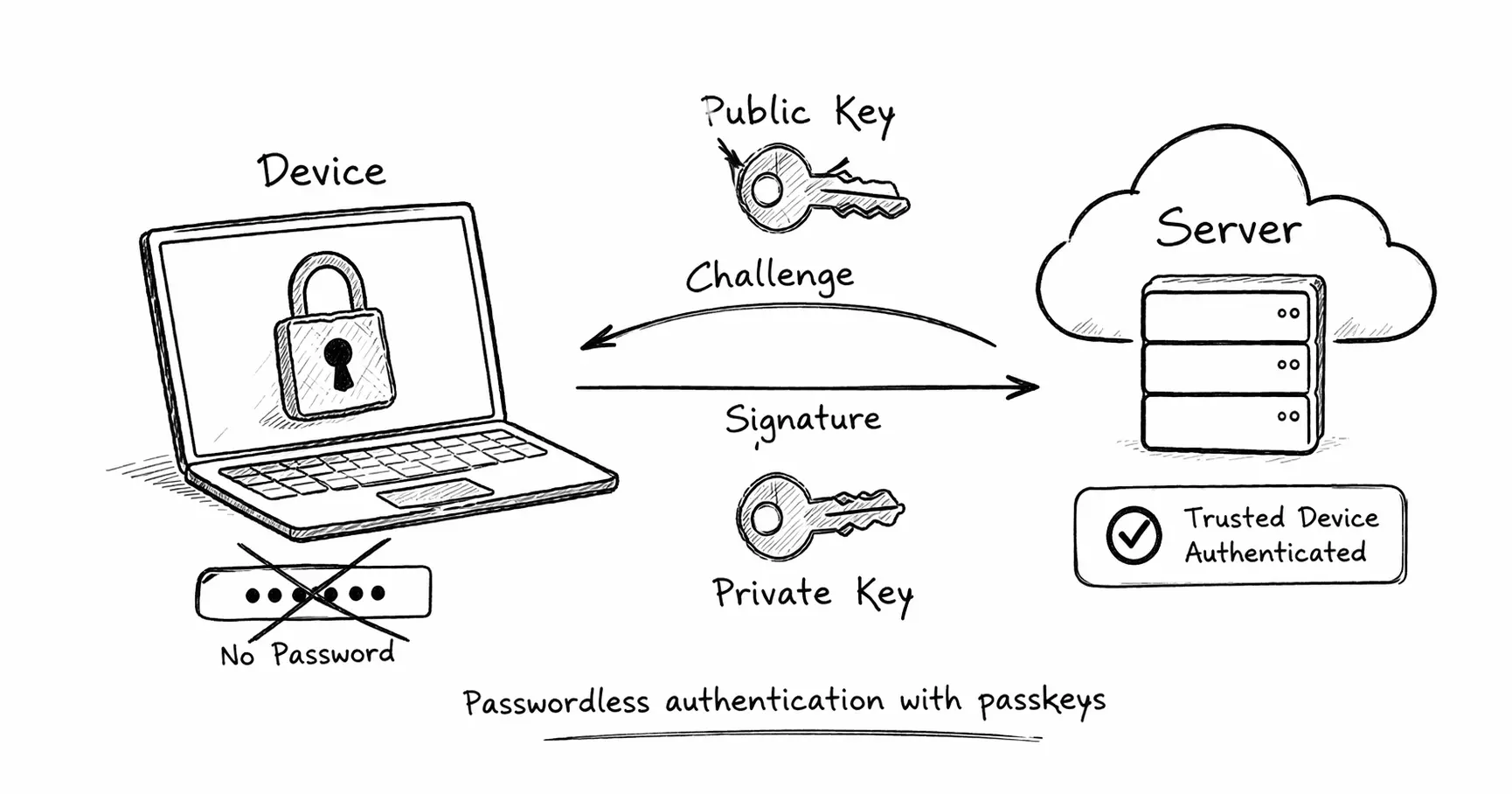
You visit a website and click “Sign in.” Instead of typing a password, you glance at your phone. Face ID confirms it’s you. You’re logged in. No password to remember, no credential to leak, no phishing risk. This is passkey authentication, and it represents the most significant shift in how we prove our identity online since passwords were invented decades ago.
Passwords have been the foundation of digital authentication since the earliest computing systems. But that foundation is cracking. People reuse passwords across sites, forget complex ones, fall for phishing scams, and watch helplessly as massive breaches expose their credentials. The password model was never designed for the modern internet, where billions of people manage dozens of accounts and attackers have industrial-scale tools for credential stuffing and social engineering.
Passkeys solve this by replacing the shared secret model with public-key cryptography. Instead of sending a password to the server, you prove you own a private key that never leaves your device. The server only stores a public key, which is useless to attackers even if stolen. The cryptographic signature you provide is unique to the website’s domain, making phishing impossible. And because everything is handled by your device’s secure hardware, the user experience is actually simpler than passwords.
This article explains how passkey authentication works from the ground up. We will cover the core cryptographic principles, the registration and login flows, the role of WebAuthn and FIDO2, how biometrics fit in, how passkeys sync across devices, and why this technology is becoming the new standard for authentication across the industry.
The Problem With Passwords
Before explaining how passkeys work, it is important to understand why they exist. Passwords have fundamental security and usability problems that cannot be fixed with incremental improvements.
Password reuse is epidemic. Most people use the same password across multiple sites. When one site is breached, attackers immediately test those credentials everywhere else. This is called credential stuffing, and it succeeds because people optimize for memorability over security.
Phishing is trivial. An attacker sends you to a fake login page that looks identical to the real one. You type your password. The attacker captures it and uses it immediately on the real site. No technical sophistication required. This attack works because passwords are shared secrets, and users have no reliable way to verify the authenticity of a login page.
Breaches expose databases. Even if a site hashes passwords correctly, a breach still hands attackers a list of usernames and hashed passwords. Weak passwords can be cracked. Strong passwords can be targeted with dictionary attacks. The core problem is that servers store something valuable to attackers.
Password fatigue is real. People manage dozens of accounts. Requiring unique, complex passwords for each one creates cognitive overload. Users resort to patterns (Password1, Password2) or write passwords down. Password managers help, but they are not universally adopted, and they introduce their own complexity.
The solution is not better passwords. The solution is eliminating passwords entirely and replacing them with a system where the server stores nothing an attacker can use.
What Is a Passkey
A passkey is a cryptographic credential based on public-key cryptography. It consists of two keys: a private key that stays on your device and a public key that is stored on the server.
When you authenticate, your device uses the private key to sign a challenge from the server. The server verifies the signature using the public key. If the signature is valid, you are authenticated. The private key never leaves your device, and the public key is useless without the corresponding private key.
This is fundamentally different from passwords. A password is a shared secret. Both you and the server know it. If the server is breached, attackers get your password. With passkeys, the server only stores a public key. Even if the server is breached, attackers cannot authenticate as you because they do not have the private key.
Passkeys are part of the FIDO2 and WebAuthn ecosystem. FIDO2 is a set of standards developed by the FIDO Alliance for passwordless authentication. WebAuthn is the web API that browsers implement to support passkey creation and authentication. Together, they define how devices, browsers, and servers interact to enable secure, phishing-resistant authentication.
The user experience is simple. During registration, the browser asks your device to create a passkey. You confirm with biometrics or a PIN. During login, the browser asks your device to sign a challenge. You confirm again. No passwords to type, no credentials to remember.
Core Components of the Passkey System
Passkey authentication involves several components working together. Understanding their roles is essential to understanding how the system works.
User Device (phone, laptop). The device where the private key is stored. This could be a smartphone, laptop, security key, or any device with a secure element capable of generating and storing cryptographic keys.
Authenticator. The component responsible for generating key pairs, storing private keys securely, and performing cryptographic signatures. On modern devices, this is typically implemented in a secure enclave (like Apple’s Secure Enclave or Android’s StrongBox) or a hardware security module. The authenticator ensures that private keys are never exposed, even to the operating system.
Browser. The software that implements the WebAuthn API. When a website requests passkey creation or authentication, the browser mediates between the website and the authenticator. The browser verifies that requests come from legitimate origins and ensures that passkeys are bound to specific domains.
Relying Party (server). The website or application that relies on passkey authentication. The server generates challenges during authentication, stores public keys, and verifies signatures. The server never sees the private key.
WebAuthn Protocol. The standard API that defines how these components communicate. WebAuthn specifies the data formats, security requirements, and interaction flows for passkey registration and authentication.
These components form a trust chain. The server trusts the browser to enforce origin binding. The browser trusts the authenticator to protect private keys. The authenticator trusts the user to verify their identity via biometrics or PIN. This layered security model is what makes passkeys resistant to credential theft and phishing.
Passkey Registration (Account Creation Flow)
When you create an account using a passkey, the registration flow generates a new key pair and registers the public key with the server. Here is how it works step by step:
-
User initiates registration. You visit a website and click “Create account” or “Sign up.”
-
Server requests passkey creation. The server sends a challenge to the browser, along with metadata including the relying party ID (the domain), a user identifier, and parameters specifying the type of credential to create.
-
Browser invokes WebAuthn. The browser calls
navigator.credentials.create()with the server’s parameters. The browser verifies that the request comes from the correct origin (the website’s domain). -
Authenticator generates key pair. The authenticator prompts you to confirm the operation (typically via biometrics, PIN, or physical button press). Once confirmed, the authenticator generates a new public-private key pair specific to this website. The private key is stored securely on the device. The key pair is bound to the relying party ID, ensuring it cannot be used for other domains.
-
Public key sent to server. The authenticator returns the public key, along with attestation data (optional proof that the authenticator is legitimate). The browser forwards this to the server.
-
Server stores public key. The server associates the public key with your account and stores it in its database. The server can now use this public key to verify signatures during authentication.
-
Registration complete. You now have a passkey for this website. The private key remains on your device. The server only has the public key.
This flow is secure by design. The private key never leaves the device. The authenticator ensures that keys are bound to specific domains, preventing one website from using a passkey intended for another. And because the server only stores public keys, a database breach does not compromise authentication credentials.
sequenceDiagram
    participant User
    participant Browser
    participant Authenticator
    participant Server

    User->>Browser: Click "Create Account"
    Browser->>Server: Request registration options
    Server->>Browser: Return challenge + RP ID + user info
    Browser->>Authenticator: navigator.credentials.create()
    Authenticator->>User: Prompt for biometric/PIN
    User->>Authenticator: Confirm identity
    Authenticator->>Authenticator: Generate key pair
    Authenticator->>Authenticator: Store private key securely
    Authenticator->>Browser: Return public key + attestation
    Browser->>Server: Send public key + attestation
    Server->>Server: Store public key for user
    Server->>Browser: Registration successful
    Browser->>User: Account created
Passkey Login (Authentication Flow)
Once a passkey is registered, authentication is a challenge-response process. The server proves you own the private key without ever seeing it. Here is the authentication flow:
-
User initiates login. You visit the website and click “Sign in.”
-
Server generates authentication challenge. The server generates a random challenge (a unique nonce) and sends it to the browser, along with the list of acceptable credential IDs for your account.
-
Browser sends challenge to authenticator. The browser calls
navigator.credentials.get()and passes the challenge to the authenticator. -
Authenticator signs challenge with private key. The authenticator prompts you to confirm the operation (via biometrics or PIN). Once confirmed, the authenticator retrieves the private key associated with the relying party ID and uses it to sign the challenge. The signature is cryptographically bound to the challenge and the origin.
-
Signature returned to server. The authenticator returns the signed challenge to the browser. The browser forwards it to the server.
-
Server verifies signature. The server uses the stored public key to verify the signature. If the signature is valid and the challenge matches, authentication succeeds. The signature proves that the request came from someone who controls the private key, and the challenge ensures freshness (preventing replay attacks).
-
User is authenticated. You are logged in. No password was sent. No shared secret was transmitted.
This challenge-response model is the cornerstone of passkey security. The server sends a unique challenge for every login attempt. The authenticator signs it with the private key. The signature can only be generated by someone who possesses the private key, and the signature is unique to the specific challenge and domain. Even if an attacker intercepts the signature, they cannot reuse it because the next login will require a different challenge.
sequenceDiagram
    participant User
    participant Browser
    participant Authenticator
    participant Server

    User->>Browser: Click "Sign In"
    Browser->>Server: Request authentication options
    Server->>Server: Generate random challenge
    Server->>Browser: Return challenge + credential IDs
    Browser->>Authenticator: navigator.credentials.get()
    Authenticator->>User: Prompt for biometric/PIN
    User->>Authenticator: Confirm identity
    Authenticator->>Authenticator: Sign challenge with private key
    Authenticator->>Browser: Return signed challenge
    Browser->>Server: Send signature + authenticator data
    Server->>Server: Verify signature with public key
    Server->>Browser: Authentication successful
    Browser->>User: Logged in
Why Passkeys Prevent Phishing
One of the most important properties of passkeys is that they are phishing-resistant. Even if a user is tricked into visiting a fake website, authentication will fail. Here is why.
Passkeys are bound to a specific domain. When you register a passkey for example.com, the authenticator stores the relying party ID (the domain) alongside the key pair. During authentication, the authenticator verifies that the request comes from the same domain. If you visit a phishing site like examp1e.com (note the “1” instead of “l”), the authenticator will refuse to sign the challenge because the domain does not match.
Origin verification happens at the device level. The browser passes the origin (the website’s domain) to the authenticator as part of the WebAuthn protocol. The authenticator includes the origin in the data it signs. The server verifies that the origin in the signed data matches the expected domain. This prevents an attacker from using a legitimate passkey on a fake site.
No credential to steal. Unlike passwords, which can be entered on a fake site and immediately captured, passkeys cannot be “typed in” to a phishing page. The authentication process requires cryptographic operations performed by the authenticator, and those operations are tightly bound to the legitimate domain.
This makes passkeys immune to phishing attacks that rely on credential theft. An attacker can create a perfect replica of a login page, but they cannot trick the authenticator into signing a challenge for their fake domain. The cryptographic binding between the passkey and the legitimate domain is enforced at the protocol level, not by user vigilance.
Device Biometrics and Passkeys
Many people assume that biometrics (Face ID, Touch ID, fingerprint) are the passkey. This is not correct. Biometrics are used to unlock access to the private key, but they do not replace the cryptographic authentication mechanism.
Here is how it works. The private key is stored in a secure enclave on your device. That enclave requires authentication to release the key for use. On most devices, this authentication is biometric (face recognition, fingerprint) or a PIN. When you confirm a passkey operation, the biometric check verifies that you are authorized to use the private key stored on that device.
Biometrics never leave the device. Your fingerprint or face data is not sent to the server. The server never sees your biometric data. The server only sees the cryptographic signature produced by the private key. The biometric check is purely local and is used to gate access to the key.
This provides layered security. Even if an attacker physically steals your device, they cannot use the passkey without passing the biometric or PIN check. And even if they somehow extract the private key (which is extremely difficult due to hardware protections), the key is only useful for the specific domains it was registered with.
Different devices support different authentication methods. Some use fingerprint sensors, some use face recognition, some use a device PIN or password. The WebAuthn protocol is agnostic to the method. It only requires that the authenticator verify the user before signing challenges.
Multi-Device Passkeys (Cloud Sync)
Passkeys are more usable when they work across multiple devices. If you register a passkey on your laptop, you want to be able to log in from your phone without re-registering. This is where synced passkeys come in.
Synced passkeys are private keys that are securely synchronized across devices. Major platforms like Apple (iCloud Keychain), Google (Google Password Manager), and Microsoft (Windows Hello) support passkey sync. When you create a passkey on one device, it is encrypted and uploaded to the cloud. Other devices signed into the same account can download and decrypt the passkey.
The synchronization is end-to-end encrypted. The passkey is encrypted before leaving your device, and only devices authenticated to your account can decrypt it. The cloud provider stores the encrypted blob but cannot decrypt it. This ensures that passkeys remain secure even if the cloud storage is compromised.
Discoverable credentials. Synced passkeys are typically implemented as discoverable credentials (formerly called “resident keys”). These are passkeys that store user information alongside the private key, allowing the authenticator to present a list of accounts associated with a given website. When you visit a login page, your device can prompt you with “Sign in as [email]” without requiring you to type your username first.
Backup and recovery. Synced passkeys provide a natural backup mechanism. If you lose your device, you can sign in on a new device using your cloud account, and your passkeys are restored. This contrasts with hardware security keys, which are typically not backed up and require account recovery mechanisms if lost.
Not all passkeys are synced. Some users prefer hardware security keys (like YubiKeys) that store passkeys locally and never sync them. These provide maximum security at the cost of convenience. Organizations deploying passkeys can choose between synced and device-bound credentials based on their threat model.
Passwords vs Passkeys
The differences between passwords and passkeys are fundamental.
Passwords are shared secrets. Both you and the server know the password. If the server is breached or an attacker intercepts the password (via phishing or keylogging), the attacker can authenticate as you. The password is a symmetric credential.
Passkeys use asymmetric cryptography. You hold the private key. The server holds the public key. The private key proves your identity without being transmitted. Even if the server is breached, attackers only get public keys, which are useless without the corresponding private keys.
Passwords are phishable. You can type a password into a fake website. Passkeys cannot be used on the wrong domain because the authenticator enforces origin binding.
Passwords require memory. You have to remember them or store them in a password manager. Passkeys are handled by your device’s authenticator. You authenticate using biometrics or a PIN, which you already use to unlock your device.
Passwords are vulnerable to credential stuffing. Reused passwords let attackers access multiple accounts after one breach. Passkeys are unique per site. A passkey for one website cannot be used on another.
Passwords can be guessed or brute-forced. Weak passwords are easily cracked. Passkeys are cryptographic keys with hundreds of bits of entropy. Brute-forcing them is computationally infeasible.
The shift from passwords to passkeys is a shift from a shared secret model to a zero-knowledge proof model. You prove you own the private key without revealing it. This is stronger security and, paradoxically, simpler UX.
Real-World Adoption
Passkey adoption is accelerating across the industry. Major platforms and websites are implementing passkey authentication as a primary or supplementary login method.
Apple introduced passkey support in iOS 16, iPadOS 16, and macOS Ventura. Passkeys are stored in iCloud Keychain and sync across Apple devices. Apple’s implementation uses Face ID and Touch ID for user verification.
Google supports passkeys across Android and Chrome. Passkeys are stored in Google Password Manager and sync across devices signed into the same Google account. Google has enabled passkey login for Google accounts themselves.
Microsoft supports passkeys via Windows Hello. Passkeys are stored locally on Windows devices or synced via Microsoft account. Microsoft has integrated passkey support into Azure Active Directory.
GitHub rolled out passkey support, allowing developers to secure their accounts with passkeys. This is particularly important for high-value accounts where security is critical.
Amazon and PayPal have also announced passkey support, bringing passwordless authentication to e-commerce and financial services. These deployments demonstrate that passkeys are ready for high-stakes use cases involving money and sensitive data.
The industry is moving toward passwordless authentication because it solves real problems. Passkeys reduce account takeovers, lower support costs (no more password resets), and improve user experience. As more sites adopt passkeys, users will come to expect them as the default authentication method.
Questions
- What makes passkeys phishing-resistant compared to passwords?
- How does the challenge-response authentication model prevent replay attacks?
Conclusion
Passkeys represent a fundamental shift in how we authenticate online. They replace shared secrets with public-key cryptography, making authentication both more secure and more usable. The private key never leaves your device, the server only stores a public key, and phishing is cryptographically impossible due to domain binding.
The benefits are clear. Stronger security eliminates credential theft and database breaches. Better user experience removes the burden of remembering passwords. Reduced phishing risk protects users even when they make mistakes. As more platforms adopt passkeys, the passwordless future is becoming the present. Understanding how passkeys work is essential for anyone building or using authentication systems in the modern web.